Basin Element
The Basin element represents a drainage area that generates runoff from rainfall. It is the fundamental source element in every HydraLink network. Basins support three rainfall-runoff methodologies: Rational Method, Modified Rational Method (MRM), and Unit Hydrograph.
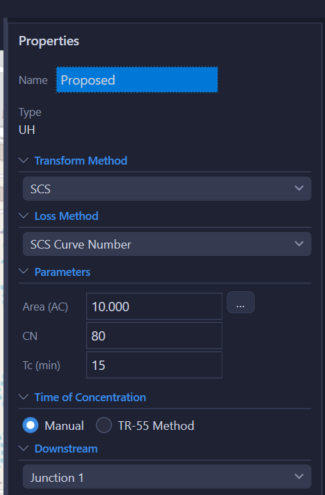
When to Use
- Every HydraLink network starts with one or more Basin elements.
- Rational Method gives quick peak flow estimates for small watersheds, storm sewer design, and inlet sizing.
- Modified Rational Method handles detention pond sizing for small watersheds using a simplified volumetric approach.
- Unit Hydrograph generates full hydrographs for detention routing, complex networks, and watersheds of any size.
Input Parameters
Every basin, whatever its methodology, carries a name, a Drains To selector that sets the downstream element, and a Share across plans option that keeps one basin's inputs identical across plans (see Plans & Scenarios).
Rational Method Parameters
| Parameter | Units | Description | Notes |
|---|---|---|---|
| Area | acres | Contributing drainage area | Set from an imported boundary, or entered directly |
| Runoff Coefficient (C) | dimensionless | Weighted C value (0–1) representing the fraction of rainfall that becomes runoff | Computed from a land-use breakdown (built-in C tables, including several adopted municipal tables, editable and saveable) or entered directly. Entering C directly replaces any land-use breakdown. Should be based on local municipality requirements. |
| Tc | minutes | Time of concentration | Entered directly (Manual) or computed with the TR-55 Method; see Time of Concentration below |
| Frequency Factor (Cf) | dimensionless | Frequency/safety adjustment factor | Default 1.0, set per storm in the Storm Configuration dialog. Some jurisdictions require an adjustment factor that varies by storm event. |
The Rational Method computes: Q = Cf × C × i × A
(an optional 1.008 unit-conversion factor can be enabled in Project Settings) where
i = rainfall intensity (in/hr) at duration = Tc. Intensity comes from the
storm’s Intensity Method (IDF equation coefficients or interpolation from the rainfall
table), and the Storm Configuration dialog’s status line shows which source the solver
uses. See the
Rational Method and
Storm Events pages for details.
Modified Rational Method Parameters
All Rational parameters plus:
| Parameter | Units | Description | Notes |
|---|---|---|---|
| Detention Method | — | Standard or Regional IDF Table (iSWM / Atlanta Regional Commission) | See MRM methodology for details on each method |
| Basin Roles | — | Target Flow, Design Area, Pass-Through, Bypass | Enable Use Model Elements to pick the elements filling each role, so the detention calculation follows the design as it evolves; otherwise type the per-storm flows directly |
| Detention Target (Qa) | cfs | Allowable release rate | Target minus bypass for each storm. When that leaves no usable release (no target selected, or bypass at or above target), type the storm’s release in the expander’s Manual column and it is used as entered |
| Region | — | Texas county (iSWM) or Georgia city (GSMM) | Required when using the Regional IDF method; provides region-specific a and b rainfall coefficients |
Regional IDF mode also asks for the pre-development C and Tc and, per storm, the 3-hour depth P180 and the depth at the critical duration Ptd. P180 can be fetched from Atlas 14 with one click.
MRM is a required volume computation only. It determines the minimum detention storage volume needed but does not perform hydrograph routing. The outfall structure should be designed such that the design flow is less than the allowable release rate for the design storm event. Care should be taken not to over-detain, as there is no check that the pond releases enough flow to prevent overtopping. See the Modified Rational Method page for full details.
MRM Basin Roles
- Design Area
- Post-development area detained in the pond. Its C and area contribute to the composite detained inflow.
- Target
- Represents pre-development conditions. Its peak flow defines the allowable release rate for the pond.
- Bypass
- Flow from the developed site that does not enter the detention pond. This flow reduces the allowable release from the pond, increasing the required detention volume.
- Pass-Through
- Off-site flow that enters the pond but is not detained. Since this is an existing flow, detention is not needed for it, but the outfall structure must be sized larger to convey pass-through flow in addition to the allowable detained release.
Unit Hydrograph Parameters
| Parameter | Units | Description | Notes |
|---|---|---|---|
| Curve Number (CN) | dimensionless | SCS curve number (0–100) representing runoff potential | Computed from soil-cover breakdown or entered directly |
| Transform Method | — | SCS Unit Hydrograph | Determines the shape of the unit hydrograph. (Clark, Snyder, and ModClark transforms are planned but not currently active.) |
| Loss Method | — | SCS Curve Number or Green-Ampt | Determines how rainfall losses are computed |
| PRF | cfs·hr/mi² | SCS peak rate factor | Set per basin; Project Settings supplies the default for new basins |
Transform-Specific Parameters
SCS Curvilinear
Uses Tc to derive lag time: tlag = 0.6 × Tc.
The peak rate factor is configurable per basin (PRF row; default 484).
Additional transform methods (Clark, Snyder, ModClark) are planned for future releases but are not currently active. The SCS Curvilinear unit hydrograph is the available transform method at this time.
Loss Method Parameters
SCS Curve Number
Uses CN to compute initial abstraction:
λ defaults to 0.20 and is editable per basin as Ia/S Ratio, which sits with CN on the panel.
Green-Ampt
| Parameter | Units | Description |
|---|---|---|
| Hydraulic Conductivity (K) | in/hr | Saturated hydraulic conductivity of the soil |
| Wetting Front Suction (ψ) | in | Capillary suction at the wetting front |
| Initial Moisture Deficit (Δθ) | 0–1 | Difference between porosity and initial moisture content |
Values can be looked up by USDA soil texture class.
Land Use Breakdown & Weighted C
HydraLink provides a customizable land use table where you enter the area and C value for each land cover type. The weighted C is computed as:
In the C lookup dialog, pick a land use from the table and Add Entry with its area, which you type. To give a land use everything the basin still has unassigned, press Fill instead, which adds it carrying the remainder. The unassigned figure is shown beside the buttons, and an area larger than what is left is reduced to it, so the breakdown does not overshoot the basin. When nothing is left to reduce it to, the area you typed is kept as typed and the dialog names the land use holding the area, so you can see what has to give way before the weighting is saved. The built-in tables can be edited and saved as your own.
The breakdown divides the basin’s area; it never changes it. Only a basin with no area yet takes the breakdown’s total as its area. If the entries add up to less than the basin, the dialog and the run’s validation say so, and the unassigned part is treated as having the weighted C. To change a basin’s size, edit its Area. You never have to type a surveyed area to its last digit: type what the unassigned line says is left (0.04 when it reads 0.04, or 5 when it reads 5.00) and the entry takes the exact remainder, and the dialog says so, so the breakdown adds up to the geometry. The line, the grid and this rule all use your display precision for drainage area (Project Settings), so what you see is what typing it gives you; any other figure is kept as typed. When you run, a breakdown short of its basin by more than 2% (and more than 0.01 ac) is warned about; a smaller gap is treated as complete.
When a basin comes from a Civil 3D parcel or an imported polygon, its Area is read from that geometry and cannot be typed; hover over the Area label to see where it comes from. To type an area for an imported basin instead, right-click it and choose Unlink Area from Polygon. A basin linked to Civil 3D parcels changes size only when its parcels do.
Soil-Cover Breakdown & Weighted CN
For the Unit Hydrograph method, enter the area, cover type, treatment, hydrologic condition, and hydrologic soil group (A, B, C, D) for each soil-cover combination. The weighted CN is:
CN values are from TR-55 Tables 2-2a/b/c for Antecedent Runoff Condition II (ARC II). The built-in CN lookup dialog provides the TR-55 tables, which you can edit and save as your own table. Add Entry with a typed area, and Fill for the area still unassigned, work as they do for C above.
Time of Concentration (Tc)
Choose Manual or TR-55 Method on the basin panel; Edit Flow Path… opens the TR-55 flow path calculator. The flow path is divided into segments:
- Sheet Flow, up to a maximum of 300 ft, using Manning's n for overland flow surfaces.
- Shallow Concentrated Flow on paved or unpaved surfaces.
- Channel Flow, using Manning's equation with channel geometry.
Tc = sum of travel times for all segments. See the Time of Concentration methodology page for full details.
Results
| Output | Units | Description |
|---|---|---|
| Peak Flow | cfs | Maximum runoff rate |
| Peak Time | h:mm | Time from start of storm to peak flow |
| Runoff Volume | acre-ft | Total volume of runoff (UH method only) |
| Hydrograph | cfs vs. time | Full runoff hydrograph (UH method only; Rational produces peak flow only) |
| MRM Detention Volume | ft³ | Required storage volume (MRM method only) |
| MRM Critical Duration | minutes | Storm duration producing maximum required storage (MRM method only) |
Methodology Considerations
- The Rational Method produces a peak flow only (no hydrograph). It is commonly used for storm sewer design, inlet sizing, and small watershed analysis. Its applicability depends on local jurisdictional criteria.
- The Unit Hydrograph method generates a full runoff hydrograph and is needed when routing through ponds, channels, or complex networks.
- The Modified Rational Method provides a required detention storage volume using a simplified volumetric approach. The MRM does not perform hydrograph routing; the engineer must independently design the outfall structure.
- The appropriate methodology for a given project depends on local design criteria, jurisdictional requirements, and the engineer’s professional judgment.
- For developed sites, ensure your C coefficient reflects post-development conditions.
- The SCS peak rate factor (PRF, default 484) is set per basin in the properties panel; Project Settings sets the default applied to new basins. Values other than 484 reshape the unit hydrograph per NEH-630 (see Unit Hydrograph).