HydraStorm
Storm Drain Hydraulic Design Inside Civil 3D
HydraStorm is an Autodesk Civil 3D plugin for storm drain hydraulic design and analysis. It reads your pipe network directly from the drawing, performs HGL/EGL calculations with live feedback, and writes changes back to Civil 3D, all without ever leaving the CAD environment. Design storm drains, analyze inlets, and evaluate culverts in one integrated tool. No more pulling data into spreadsheets, running calcs externally, and copying results back.
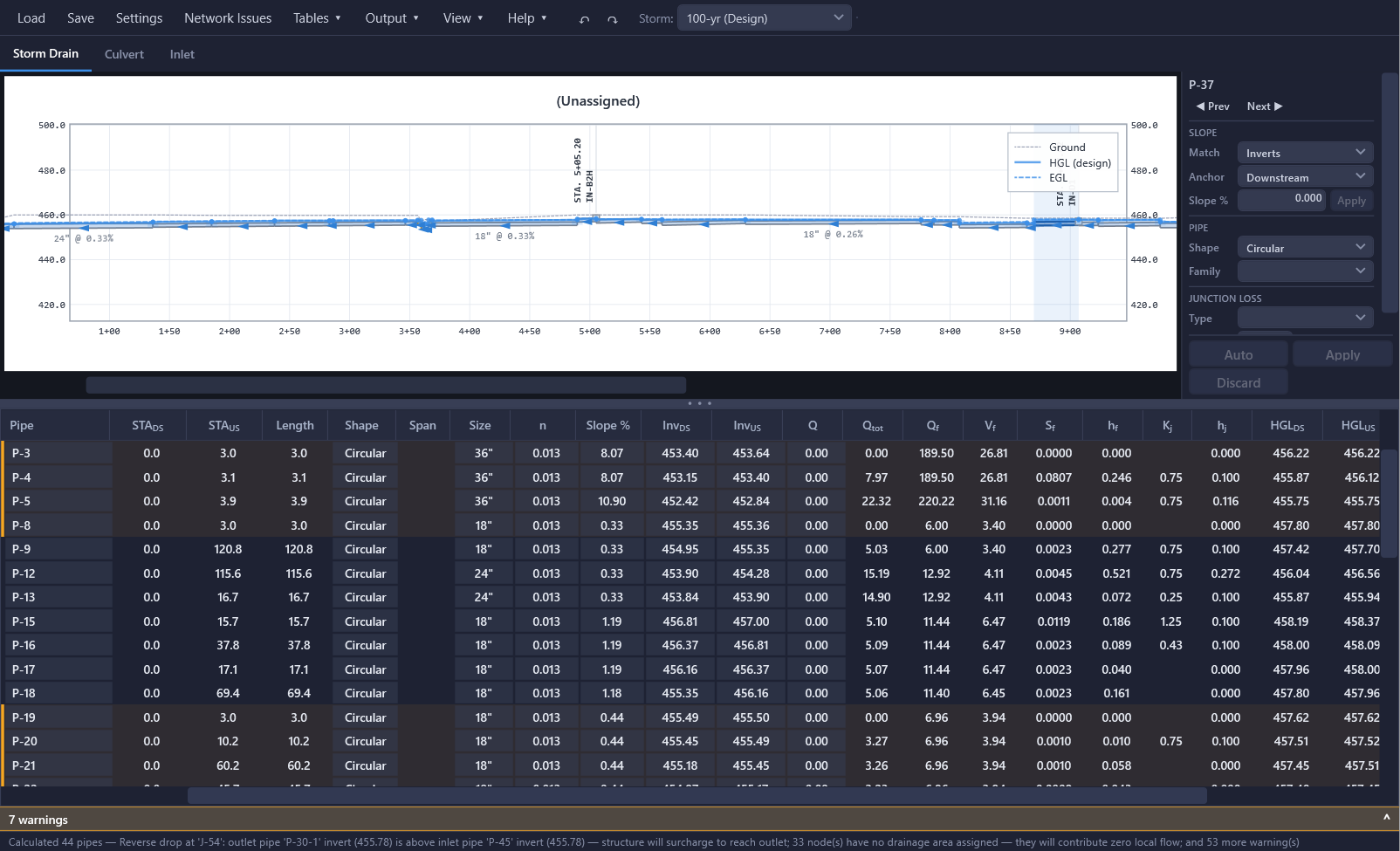
Never leave Civil 3D. Load your pipe network, edit pipe geometry, run hydraulic calculations, review the HGL, apply changes, create profiles, and export results, all from one window inside Civil 3D.
Key Capabilities
Live Hydraulic Analysis
- HGL & EGL computation (downstream → upstream)
- Junction loss analysis (HEC-22, iSWM, custom expressions)
- Interactive profile view with real-time feedback
- Pipe crossing clearance detection
- Ground surface overlay
- Compliance checking with pass/fail tracking
Flexible Hydrology
- Peak flow entry (manual design flows)
- Rational Method (Q = CIA) with Tc accumulation
- HydraLink import (.hyd / .hlresults)
- NOAA Atlas 14 IDF curves (fetch or CSV)
Multi-Storm Analysis
- Define multiple storm events per project
- Independent storms for storm drain, inlets, and culverts
- Choose which storm drives pipe sizing
- Storm frequency adjustment factors (Cf)
- Profile any storm to Civil 3D
Pipe Editing & Auto Design
- Edit inverts, slope, size, and material in-place
- Raise/lower, set slope, and match to adjacent pipes
- Match by invert, centerline, or crown
- Pipe sizes tied to the Civil 3D parts list
- Automatic pipe sizing with HGL backtracking
- Full undo/redo for all edits
Junction Loss Libraries
- Built-in HEC-22, iSWM/NCTCOG, and starter libraries, plus municipality-specific standards
- Create custom libraries with the expression editor
- Automatic curved-pipe (bend-radius) barrel loss on curved conduit
- Smart memory: learns loss types by part description
- Bulk assignment via the Minor Losses table
- Need a custom library? Contact support
Inlet Design
- HEC-22 grate, curb opening, combination, and slotted drain methods
- Drop/area inlets and Y-inlets, sized per structure
- Sag and on-grade analysis, with structure cutaway and rating-curve pictures
- Gutter flow spread and depth calculations
- Bypass flow routing to downstream inlets
- Captured flows feed into the pipe network
- Built-in and custom inlet libraries
Culvert Analysis
- FHWA HDS-5 methodology (inlet and outlet control)
- Circular, box, and CMP entrance types
- Multi-barrel support
- Downstream channel tailwater analysis
- Roadway overtopping check against a modeled crest
- Independent culvert design and check storms
Civil 3D Integration
- Read pipe networks directly from the drawing
- Apply edits back to Civil 3D objects
- Create profile views and HGL layout profiles per alignment
- Apply pipe and structure label styles
- Draft storm/culvert/inlet CAD tables, tracked and re-drafted in one click as results change
- Pipe sizes from the Civil 3D parts list
Drawing Hygiene & Onboarding
- Drawing → Network Issues: connectivity problems (orphaned basins, broken bypass targets, pass-through ponds, and more) in one navigable list
- Drawing → Clean Up Drawing offers suggest-and-confirm fixes for drafting defects: reversed/zero-length pipes, missing reference alignments, rims
- Drawing → Rename Parts by Run numbers structures and pipes from each run's outfall upstream
- Drawing → Label Fittings writes manufactured-fitting-style part descriptions onto classified wyes, bends, and pipe-size changes
- Guided Tour: a first-run, replayable walkthrough of the interface using a bundled sample project
Eliminate the Spreadsheet
The traditional storm drain design workflow looks like this: export pipe data from Civil 3D, paste it into a spreadsheet, run your HGL calculations, then go back to Civil 3D to update pipe sizes and inverts. Every design iteration means another round trip.
HydraStorm replaces that entire loop. Your pipe network loads directly from the drawing. Calculations run instantly as you edit. Changes apply back to Civil 3D with one click. And if you still want a spreadsheet to verify results or submit with your drainage report, use Output ▾ > Export > Excel Workbook... for the full Storm Calcs workbook, which includes, when the inlet module is enabled, an Inlet Summary sheet with a per-run runoff/capture ledger and an exception list. See Export for the workbook's sheets and column layout.
Pipe Sizes from the Parts List
When you change a pipe size in HydraStorm, the available sizes come directly from the Civil 3D parts list assigned to that network. If your parts list includes 18", 24", 30", and 36" RCP pipes, those are the only sizes available in the dropdown. This ensures that every pipe size you select in HydraStorm corresponds to a real part in Civil 3D that can be applied back to the drawing. When you change part families (e.g., switching from RCP to HDPE), the available sizes update automatically.
Smart Memory
HydraStorm learns from your choices to speed up future projects. When you assign a junction loss type to a Civil 3D part (for example, setting a "45 Degree Bend" structure to a specific energy loss equation), HydraStorm remembers that association. The next time you load a project using the same loss library and encounter the same part description, the loss type is suggested automatically. This same learning applies to inlet type assignments, matching Civil 3D structure descriptions to the appropriate inlet capacity method. Memory is scoped per library, so switching between HEC-22 and iSWM projects won't cause cross-contamination.
Design Standards & Criteria
Each junction loss library can carry optional design criteria: municipality-specific design parameters such as storm return periods, velocity limits, pipe cover, minimum diameter, and HGL cover requirements. When you apply a design standard that includes criteria, HydraStorm prompts you with a checklist showing which settings differ from your current project. Accept or decline each recommendation individually to quickly configure your project for a specific jurisdiction's requirements.
Compliance Checking
After each calculation, HydraStorm evaluates every pipe against your design criteria and reports a pass/fail summary. The compliance column in the results grid shows a score like "4/6" (4 of 6 checks passed). Hover over the cell for details on each individual check. If a failure is intentional (e.g., an existing pipe you can't resize), you can acknowledge it. Acknowledged failures turn the indicator yellow instead of red, distinguishing reviewed exceptions from unresolved issues.
Tables for Fast Data Entry
The Tables menu provides spreadsheet-style grids for bulk editing. Instead of clicking through pipes one at a time, open a table and edit Manning's n values, hydrology inputs, or junction loss assignments across your entire network at once.
- Pipe Table: bulk edit Manning's n values
- Hydrology Table: enter peak flows or configure rational method parameters
- Minor Losses Table: assign loss types and Kj overrides
- Basin Assignment: drag HydraLink basins and junctions onto structures
- Alignment Types: classify each alignment as Storm Drain, Culvert, or None
- Culvert Roadways: embankment crest and weir geometry for HDS-5 overtopping
Live Profile View
The interactive profile canvas shows your pipe network in profile with optional overlays:
- HGL (Hydraulic Grade Line) shows where the water surface sits relative to pipe crowns
- EGL (Energy Grade Line) visualizes energy losses through the system
- Ground shows the ground surface profile for cover verification
- Crossings detects and displays pipe crossing conflicts with clearance violations
As you edit pipe geometry, the profile and calculations update in real time so you can see the impact of your changes immediately. The profile also displays the check storm HGL when multi-storm analysis is enabled, with configurable colors and line styles for each overlay.
Typical Workflow
- Type
HYDRASTORMat the Civil 3D command line to open the plugin - Select your pipe network from the dropdown
- Open Settings to configure hydrology mode and storm events
- Set alignment design types from Tables > Alignment Types... to mark each alignment as Storm Drain, Culvert, or None
- Enter flows via the Hydrology Table (or link to HydraLink)
- Choose a design standard and assign junction loss types via the Minor Losses Table
- Configure inlet types if the inlet module is enabled
- Press
F5to run the analysis (there is no dedicated Calculate button; results also refresh automatically a moment after each edit) - Review results in the profile view, results grid, and compliance summary
- Edit pipe geometry as needed; the profile updates live
- Optionally run Auto Design for an initial pipe sizing
- Click Apply to write changes back to the drawing
- Use the Output menu to create HGL Profiles and apply Label styles for plan production
- Export results for verification or submittal
Target Audience
Civil engineers and stormwater designers using Autodesk Civil 3D 2025 or later for storm drain design. HydraStorm is designed for professionals who want to eliminate the spreadsheet round-trip and perform hydraulic design directly inside their CAD environment.
Support
Need help building a custom loss library or inlet library? Have a feature request or found a bug? Reach us at support@bezaleldesignlab.com.