Storm Events
Overview
Storm events define the rainfall input for your HydraLink model. Each storm event specifies a return period, total rainfall depth, duration, and rainfall distribution. HydraLink supports multiple storm types to cover different design scenarios and regional requirements.
Storm Event Parameters
| Parameter | Units | Description |
|---|---|---|
| Name | — | User-defined storm label (e.g., “100-yr, 24-hr”) |
| Return Period | years | Design storm recurrence interval (e.g., 2, 5, 10, 25, 50, 100) |
| Total Rainfall Depth | inches | Total precipitation over the storm duration |
| Storm Duration | hours | Duration of the storm (default 24 hours) |
| Storm Distribution | — | Temporal distribution of rainfall within the storm |
| Frequency Factor (Cf) | — | Rational frequency adjustment factor, 1.0–1.5 (default 1.0) |
Storm Distributions
SCS Rainfall Distributions
The NRCS (formerly SCS) developed four standard 24-hour rainfall distributions based on regional rainfall patterns across the United States:
| Distribution | Region | Peak Intensity Timing | Description |
|---|---|---|---|
| Type I | Pacific maritime (CA, OR, WA coast) | ~10 hours | Gentle, drawn-out storms |
| Type IA | Pacific Northwest inland | ~8 hours | Least intense of all types |
| Type II | Central and Eastern US (most common) | ~12 hours | Moderate intensity with sharp peak |
| Type III | Gulf Coast and Atlantic tropical | ~12 hours | Highest intensity, tropical storms |
Each distribution defines the cumulative fraction of total rainfall at each time increment across the 24-hour storm, following the NRCS published distributions.
Type II is the most commonly used distribution in the United States. Unless your project is in a coastal Pacific or Gulf/Atlantic tropical region, Type II is likely the correct choice. Check your local jurisdiction’s requirements.
Custom Distribution
Define your own temporal rainfall pattern. Import a CSV of (time fraction, cumulative depth fraction) pairs, both 0–1, with Import Distribution CSV. This allows modeling of:
- Non-standard storm durations
- Historical observed storm patterns
- Local design storms mandated by specific jurisdictions
Frequency Storm (Alternating Block Method)
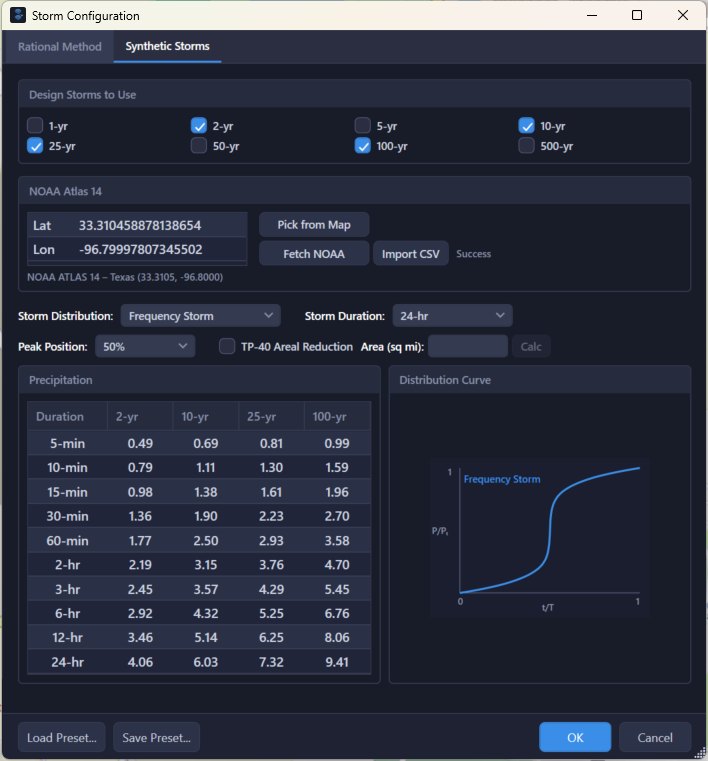
The Frequency Storm uses NOAA Atlas 14 precipitation frequency data to construct a design storm using the HEC-HMS alternating block method:
- Retrieve depth-duration-frequency data from NOAA Atlas 14 for the project location
- Compute incremental depths for each duration interval
- Sort incremental blocks in descending order
- Alternate placement: highest block at the chosen Peak Position (25–75%, default 50%), then alternating either side
- At 50% the result is a symmetric storm with peak intensity at the center
This method produces a storm that matches the IDF curve at every duration simultaneously, meaning the storm is the design storm for all sub-durations, not just the 24-hour duration.
The Frequency Storm is particularly useful for detention design because it represents the critical rainfall intensity for all durations, ensuring the detention facility is sized for the worst-case combination of intensity and duration.
NOAA Atlas 14 Precipitation Data
HydraLink integrates with NOAA Atlas 14 to retrieve precipitation frequency estimates for any location in the United States.
What NOAA Atlas 14 Provides
- Precipitation depths for multiple durations (5-minute through 60-day)
- Multiple return periods (1-year through 1000-year)
- Point precipitation estimates based on regional frequency analysis
How to Use in HydraLink
- Open the Storm Configuration dialog (Model tab → Storm)
- Enter your project coordinates (latitude/longitude), or click Pick from Map
- Click Fetch NOAA, or Import CSV for a downloaded PFDS file
- HydraLink retrieves and stores the full precipitation frequency dataset
- Individual storm events can then reference this data for their total rainfall depth
Intensities can also be typed or pasted straight into the duration table, for example from a municipal criteria table.
Common Return Periods
| Return Period | Typical Application |
|---|---|
| 2-year | Water quality treatment, minor drainage |
| 5-year | Minor storm sewer design |
| 10-year | Storm sewer design, minor road crossings |
| 25-year | Major storm sewer, roadway drainage |
| 50-year | Major crossings, critical infrastructure |
| 100-year | Floodplain management, detention design, major structures |
| 500-year | Dam safety, emergency spillways |
IDF Curve Coefficients (b, d, e)
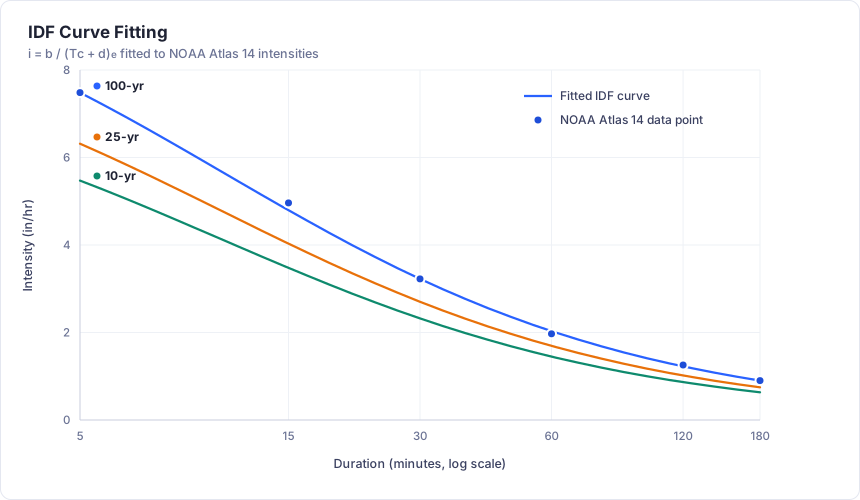
The IDF (Intensity-Duration-Frequency) curve is central to the Rational Method and Modified Rational Method. It defines how rainfall intensity varies with storm duration for a given return period.
IDF Equation
Where:
- i = rainfall intensity (in/hr)
- Tc = duration (minutes)
- b = numerator parameter
- d = time shift parameter (minutes)
- e = exponent parameter (dimensionless)
Sources of b, d, e Coefficients
HydraLink provides multiple ways to obtain IDF coefficients:
1. Manual Entry of b, d, e Values
You can directly enter b, d, e values from published IDF tables, local drainage manuals, or jurisdictional standards (e.g., TxDOT Hydraulic Design Manual tables). This is useful when your jurisdiction provides pre-computed coefficients for the project location.
2. Import NOAA Atlas 14 Values
HydraLink can import NOAA Atlas 14 precipitation frequency data by entering the project coordinates (latitude/longitude). Atlas 14 provides rainfall depths for a comprehensive matrix of durations (5-minute through 60-day) and return periods (1-year through 1000-year). This data serves as the basis for IDF curve fitting.
3. Develop b, d, e from NOAA Atlas 14 (Curve Fitting)
Once Atlas 14 data is imported, HydraLink performs a least-squares optimization to fit the b, d, e coefficients to the depth-duration-frequency data for each return period. The fit quality is reported as:
- R² per storm in the coefficient table: coefficient of determination (goodness of fit)
- A summary line under the IDF chart giving the minimum and average R² and the largest percent error across the fitted curves
This allows the engineer to evaluate whether the fitted IDF curve adequately represents the Atlas 14 data for the project location.
4. Develop b, d, e from User-Entered Intensity Data
You can also enter intensity-duration data points manually (from local rainfall studies, gauge records, or other sources) and have HydraLink fit the b, d, e coefficients to your custom data. This is useful when working with non-NOAA rainfall sources or site-specific rainfall records.
Atlas 14 Interpolation Modes
When using NOAA Atlas 14 data directly (without IDF curve fitting), HydraLink must interpolate between the discrete duration data points to determine rainfall depth or intensity at any arbitrary duration. Two interpolation modes are available:
Log-Log Interpolation (Default)
Performs interpolation in log-transformed space (both duration and depth are log-transformed before interpolation). This produces a more accurate curve fit of Atlas 14 data because depth-duration-frequency relationships are approximately linear on a log-log scale. Log-log interpolation generally provides better results, particularly for shorter durations where the intensity curve has more curvature.
Linear Interpolation
Performs standard linear interpolation between adjacent Atlas 14 data points in arithmetic space. While simpler, this may not follow the natural curvature of the DDF relationship as closely as log-log interpolation, especially between widely spaced duration intervals.
The interpolation mode is a project setting, chosen beside Interpolate from the table in the Storm Configuration dialog or in Project Settings; it applies to every Atlas 14 lookup in the project. The engineer should select the interpolation method based on local practice and judgment regarding the accuracy needed for the project.
How Rainfall Intensity is Resolved
For the Rational Method and Modified Rational Method, HydraLink resolves rainfall intensity according to the Intensity Method chosen in the Storm Configuration dialog:
- IDF equation (b, d, e): when the IDF-equation method is selected
and coefficients exist for the return period (fitted from the rainfall table or typed
from published criteria),
i = b / (Tc + d)^eis evaluated at Tc. For a Tc outside the durations the coefficients were fitted to, the status line described below says what the solver uses. - Table interpolation applies when “Interpolate from the table” is selected (or no coefficients exist); intensity is interpolated directly from the rainfall table (log-log or linear interpolation). Coefficients that exist while this method is selected stay dormant, kept rather than deleted, so switching back is non-destructive.
- Fallback uses total storm depth divided by storm duration. This is a rough approximation, is always flagged in the solver warnings, and should be avoided for final design.
The dialog’s “Solver will use…” status line states which of these applies to the current configuration.
All Rational Method calculations ultimately use one of these intensity sources. The storm distribution type (Type I, II, III, etc.) and the alternating block hyetograph are used for Unit Hydrograph analysis, not for the Rational Method. The Rational Method evaluates intensity at a single point (duration = Tc) using the IDF curve or one of the other sources above.
Additional Uses of IDF Data
- In Frequency Storm construction, the IDF data provides the depth-duration relationship used by the alternating block method to build the design hyetograph for Unit Hydrograph analysis.
- For the Modified Rational Method, MRM detention sizing iterates over multiple storm durations, evaluating the IDF curve at each duration to determine the critical storage requirement.
Synthetic Storm Options for Unit Hydrograph Basins
When using the Unit Hydrograph methodology, a temporal rainfall distribution defines how the total storm depth is distributed over the storm duration. HydraLink provides several synthetic storm options:
SCS Type Distributions
The NRCS (formerly SCS) developed four standard 24-hour dimensionless rainfall distributions. These distributions define the cumulative fraction of total rainfall at each time increment:
| Distribution | General Region | Characteristics |
|---|---|---|
| Type I | Pacific maritime (CA, OR, WA coast) | Gentle, drawn-out storms with peak at ~10 hours |
| Type IA | Pacific Northwest inland | Least intense distribution, peak at ~8 hours |
| Type II | Central and Eastern US | Moderate intensity with sharp peak at ~12 hours |
| Type III | Gulf Coast and Atlantic tropical | Highest intensity, tropical storms, peak at ~12 hours |
The appropriate distribution depends on the project location and local jurisdictional requirements. The engineer should verify which distribution is required for their area.
Frequency Storm (Alternating Block Method)
The Frequency Storm constructs a design storm using the HEC-HMS alternating block method from NOAA Atlas 14 depth-duration-frequency data:
- Retrieve depths for multiple durations from the Atlas 14 data for the project location
- Compute incremental depth blocks for each duration interval
- Sort blocks in descending order of intensity
- Alternate placement around the chosen Peak Position (25–75%, default 50%): highest block at that position, then alternating either side
At the default 50% the result is a symmetric storm that matches the IDF curve at every sub-duration. This means the storm is simultaneously the design storm for all durations, not just the overall storm duration. This property can be particularly useful for detention design.
Custom Distribution
Define your own temporal rainfall pattern by importing a CSV of (time fraction, cumulative depth fraction) pairs with Import Distribution CSV. Custom distributions allow modeling of:
- Non-standard storm durations (other than 24 hours)
- Historical observed storm patterns
- Local design storms mandated by specific jurisdictions
- Agency-specific distributions not included in the standard SCS types
Custom distributions must start at (0, 0) and end at (1, 1), with time fractions strictly increasing and cumulative depth fractions non-decreasing.
Frequency Factor (Cf)
The frequency factor lets jurisdictions apply a safety or frequency adjustment to computed flows. It is set per storm in the Storm Adjustment group on the Intensity Based tab, and the adjusted Rational Method equation becomes:
Default Cf = 1.0 (no adjustment). Some jurisdictions (e.g., Dallas County per iSWM Eq 2.20) require Cf > 1.0 for higher return periods; values above 1.5 are outside the usual range. HydraLink warns when C × Cf exceeds 1.0, since runoff cannot exceed rainfall. The product is not capped automatically, so lower C or Cf if your criteria cap it at 1.0.
Design Storm Selection Guide
| Design Objective | Available Approach |
|---|---|
| Peak flow only (Rational Method) | IDF curve from NOAA Atlas 14 fitting, manual b/d/e entry, or direct Atlas 14 interpolation |
| Full hydrograph (Unit Hydrograph) | SCS Type distribution, Frequency Storm, or custom distribution |
| Detention sizing (critical duration) | Frequency Storm (alternating block) captures the critical intensity at all sub-durations |
| Jurisdictional compliance | Match local requirements for distribution type and rainfall source |
| Multiple return periods | Create separate storm events for each return period (e.g., 2, 5, 10, 25, 100-yr) |
Tips & Best Practices
- Always use NOAA Atlas 14 for the most current precipitation frequency estimates. Older IDF references may be outdated.
- Create multiple storm events (e.g., 2-yr through 100-yr) to evaluate your system across a range of conditions.
- For detention design, include the storm(s) required by your jurisdiction, typically the 100-year event.
- The Frequency Storm is the most conservative approach for detention because it maximizes intensity at every duration.
- Verify that your total rainfall depth matches published values. NOAA Atlas 14 reports depths at the project point, not an areal average.
- For large watersheds (> 10 mi²), consider applying an areal reduction factor to the point rainfall depth. Tick TP-40 Areal Reduction on the Frequency Storm and enter (or Calc) the area.
References
- NOAA (2013). NOAA Atlas 14: Precipitation-Frequency Atlas of the United States.
- NRCS (1986). Urban Hydrology for Small Watersheds, TR-55.
- USACE (2000). HEC-HMS Technical Reference Manual.
- Hershfield, D.M. (1961). Rainfall Frequency Atlas of the United States, TP-40 (superseded by Atlas 14).