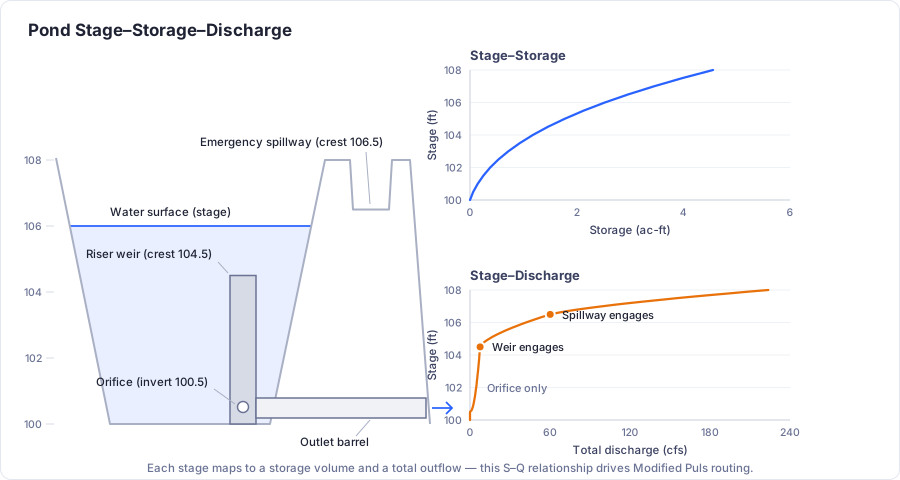
Pond Element
The Pond element models detention and retention facilities that store and attenuate stormwater runoff. Ponds use elevation-area tables to define their storage geometry and can route inflow hydrographs using the Modified Puls method or size detention using the Modified Rational Method (MRM).
When to Use
- Detention pond design and analysis
- Retention basin modeling
- Any facility that temporarily stores runoff and releases it at a controlled rate
- MRM detention sizing for small watershed studies
Storage Modes
Two storage modes are available.
Above-Ground (Elevation-Area Table)
Define the pond geometry using an elevation-area table. HydraLink computes the volume between each elevation increment using one of two methods:
-
Conic Method (default):
V = h/3 × (A1 + A2 + √(A1 × A2)), accurate for ponds with sloping sides. -
Average End Area Method:
V = h/2 × (A1 + A2). Simpler, but slightly overestimates volume.
Example Elevation-Area Table
| Elevation (ft) | Area (ft²) |
|---|---|
| 100.0 | 0 |
| 101.0 | 500 |
| 102.0 | 1,200 |
| 103.0 | 2,100 |
| 104.0 | 3,200 |
| 105.0 | 4,500 |
Rows can be added, inserted, or deleted in the elevation-area editor, imported from CSV, or pasted straight from a spreadsheet.
Underground Chamber System
Instead of an elevation-area table, an underground system can be laid out from a library of manufactured chambers. Pick a product, lay the chambers out in rows, and optionally count the surrounding stone backfill (and the stone base beneath it) as storage using a void ratio. HydraLink builds the stage-storage curve from the layout, and routing and MRM sizing then use it exactly as they use an above-ground table.
Wet Ponds: Set the Normal WSEL
A wet pond holds a permanent pool before the storm arrives. That water is not detention, so HydraLink measures storage from the pool, not from the pond bottom.
- Enter the elevation-area table down to the real pond bottom, as for a dry pond.
- Type the pool elevation in Normal WSEL (ft) under the table picker. Leave it blank for a dry pond.
- Set every outlet opening at or above the pool: riser orifice flow lines and weir crests, weir structure crests (the spillway included) and the secondary culvert invert. An opening exactly at the pool is fine.
- If the primary culvert sits below the pool, put a riser on it. A barrel below the pool with no riser would drain it.
- Turn exfiltration off. A pond that holds a pool is not losing water to the ground.
- For a user-defined rating curve, enter 0 cfs at and below the pool.
The stage-storage-discharge table and the rating curve then start at the pool with zero storage. The line under the table gives the volume held below the pool, which is the number to use if you also need the pool as a water-quality volume. Required MRM volumes, routed peak storage and the storm markers are all measured above the pool, so a pond “provides” only what it can store between the pool and its top. The Schematic tab shades the pool as water, and the Riser tab draws it as a line labelled Normal WSEL.
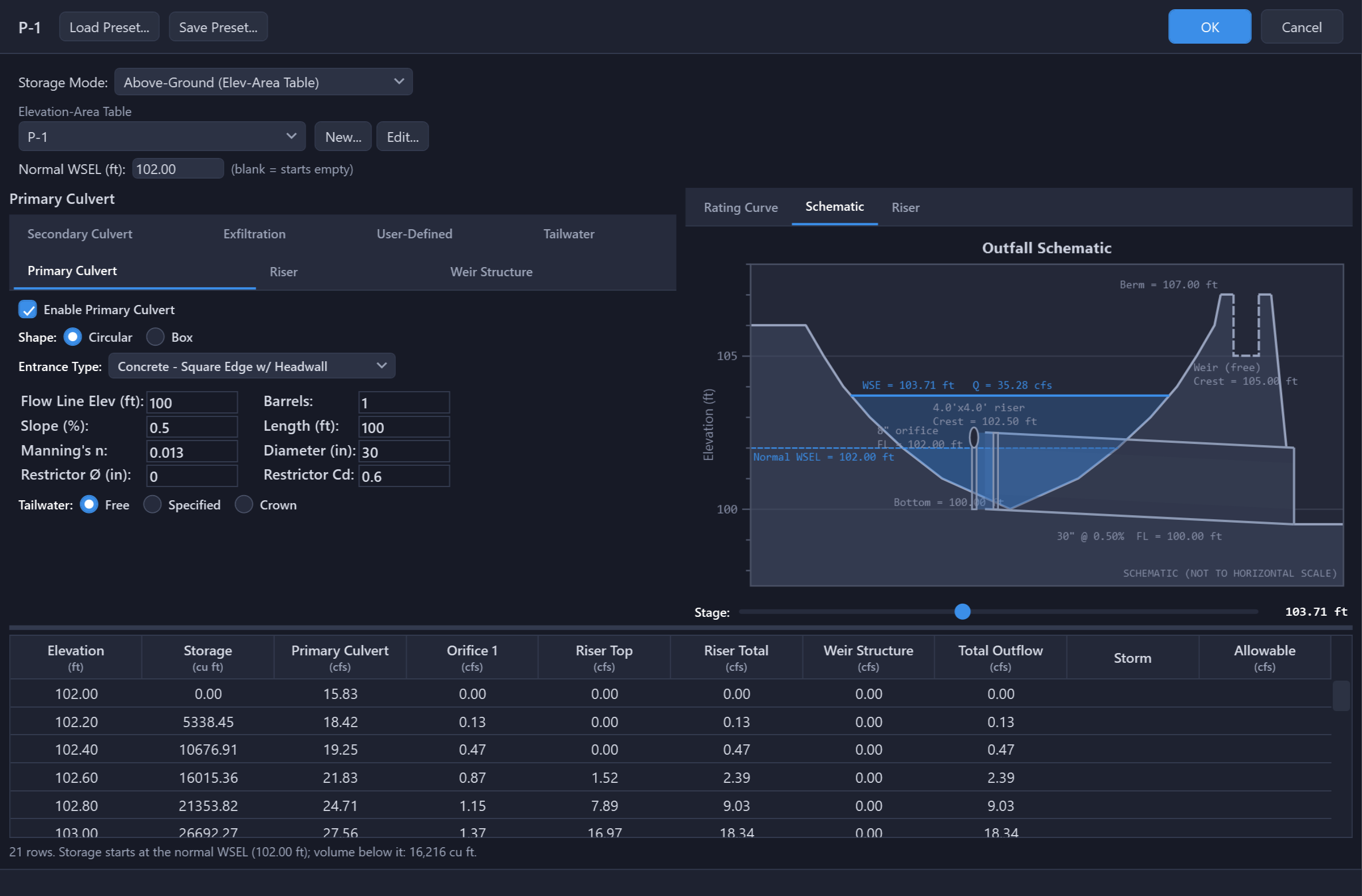
If anything above conflicts with the pool, the warning line under the table names the structure and both elevations as soon as you type it, and OK refuses the pond until it is fixed. Pond presets do not carry the Normal WSEL, since it belongs to the site: loading a preset keeps the pool you typed, and any preset opening below it is flagged the same way.
Outlet Structures
Ponds use a combination of outlet structures to control the outflow at different stages. The structures combine the way they are built. A riser or weir structure that drains into the primary culvert can release no more than that culvert passes, while outlets that discharge on their own (the secondary culvert and any weir set to spill freely, such as a spillway) add to the release. The rating curve shows the combined result at every stage. Exfiltration is tracked separately and is not routed downstream.
The Pond dialog’s Schematic tab, beside the rating curve, draws the outlet as configured (the culvert, the riser with its openings, the weir wall, and a notch through the berm for the weirs that spill freely) against the pond section, with a stage slider that moves the water surface so you can see which devices engage at any elevation. It is the quickest check that the structure you typed is the one you meant.
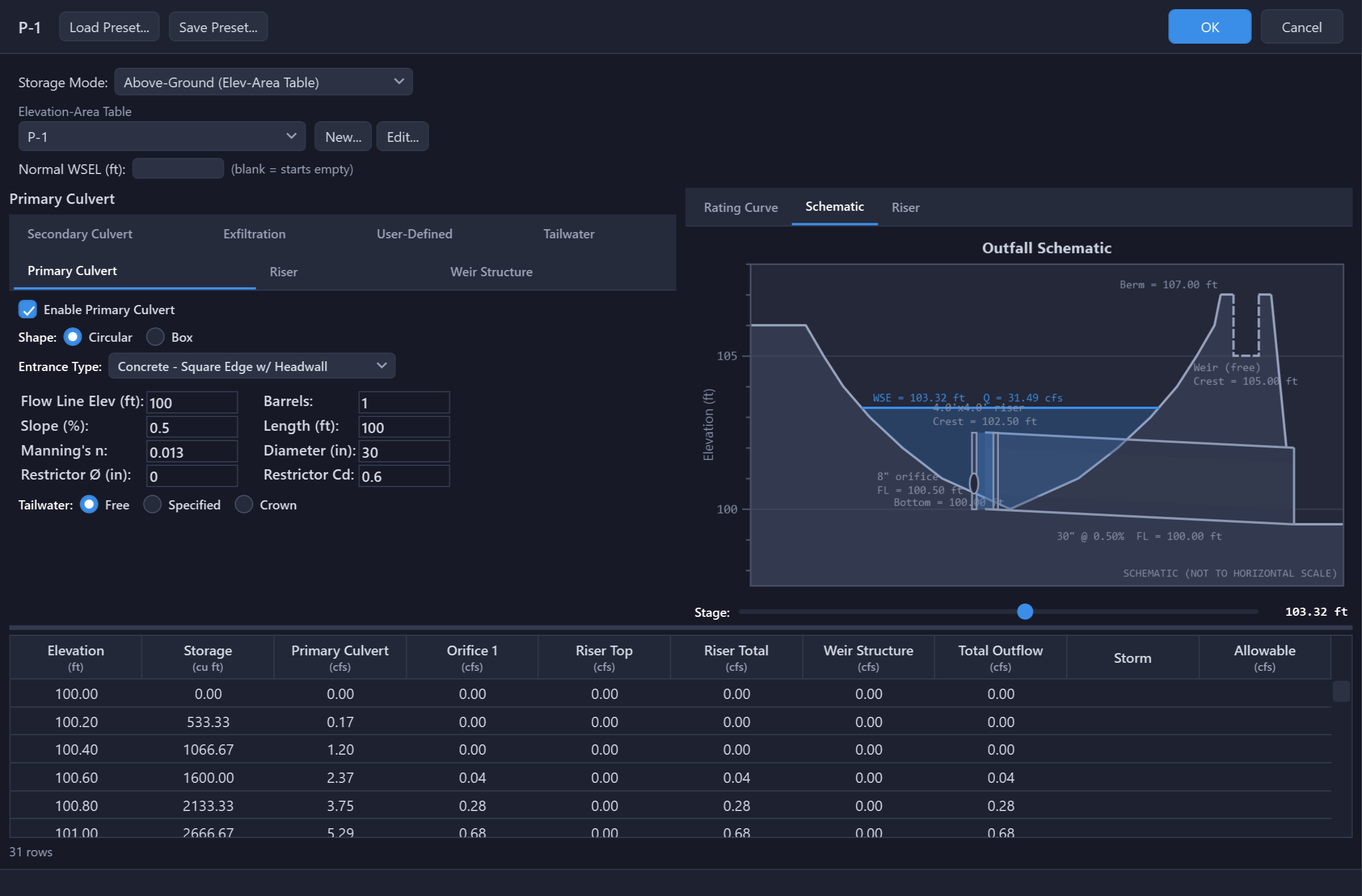
The Riser tab beside it draws the riser structure itself, one wall at a time, the way a construction detail does: the wall to scale, the weir notches and orifices cut out of the face you pick (Front, Right, Back or Left), the openings on the opposite wall and the outlet barrel dashed where they are hidden (the barrel shows dashed through any orifice or notch in front of it), and a label ladder giving every rim, crest, flowline and invert elevation. The barrel always leaves through the Back wall, so the Back view shows the pipe end and any restrictor plate on it. A circular riser’s wall is a quadrant of its rim, drawn as you would see it from outside: openings away from the center read narrower than their size, and two thin lines mark where the quadrant ends. Storm water surfaces cross the drawing as a preview: for MRM basins upstream, the stage where the pond’s storage meets each storm’s requirement; for unit hydrograph basins, the last analysis’s inflows re-routed through the outlet as you have it configured now. Run the analysis to publish them; nothing on this tab is saved with the pond.
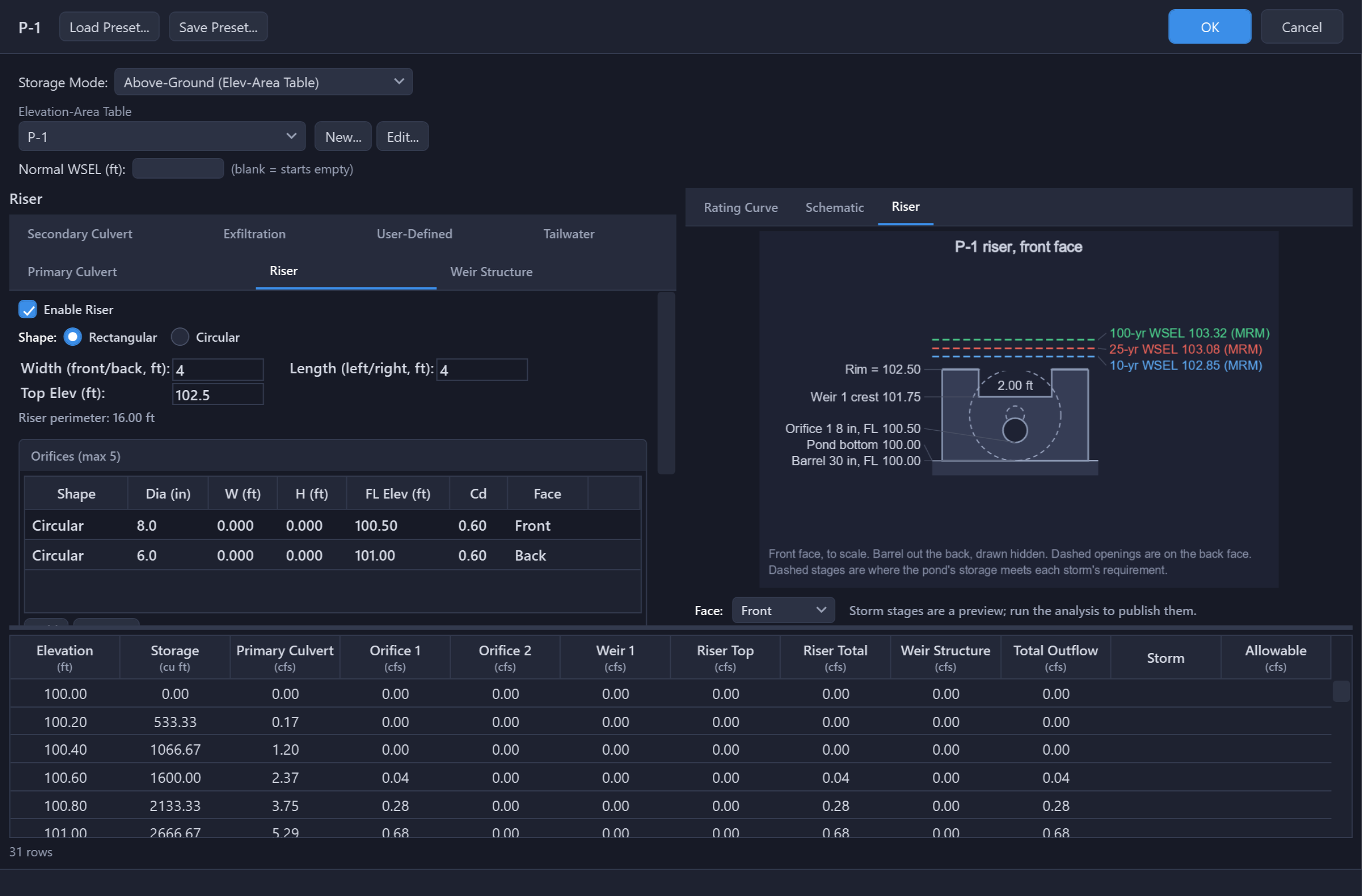
The same drawing goes into the report. A detailed PDF or Word report prints the riser under Riser Structure in the pond’s section, right below the outlet summary that describes it: the front wall always, the back wall when the barrel leaves through it or an opening sits on it, and a side wall when you have put an opening there. The water surfaces on a printed figure are not a preview. They are the stages from the analysis, the same numbers the routing or sizing table on the page gives. If you edit the model after the run, the figure draws the structure but leaves the stages off and says why: the wall it draws is the one you have now, and measuring the old run’s water surfaces against it could show a storm topping a rim that the analysis never saw. Run the analysis again and they come back. A pond with no riser, a pond that stores underground, and a pond whose outflow you typed as a stage-discharge curve print no figure, since in each case there is no riser doing the work.
Outlet Elevations
Every opening has to sit inside the pond it drains. OK in the Pond dialog (and Outfall Design… in the Civil 3D palette) refuses these, naming the structure and both elevations:
- A riser top above the pond’s highest contour, or any flow line, riser top or crest below the pond bottom.
- An orifice or riser weir above the riser top, since an opening cannot sit above the structure it is cut into.
- A weir crest above the pond top, since it could never engage.
- On a wet pond, any opening below the Normal WSEL, a primary culvert below the pool with no riser, or a Normal WSEL at or above the pond top (see Wet Ponds).
Equal is allowed, so a spillway weir cresting at the top contour is fine. If the berm really is higher than the table says, extend the elevation-area table up to it rather than moving the crest down. The solver applies the same rules to a file edited by hand, so a pond that passes the dialog passes the run.
1. Primary Culvert
A culvert barrel at the base of the pond. Analyzed using the same HDS-5 methodology as the standalone Culvert element. Configure barrel shape, dimensions, entrance type, length, slope, and Manning's n. An optional restrictor plate can be added over the barrel entrance to further throttle outflow, with the more restrictive of the plate and the barrel governing.
2. Primary Riser
A vertical riser structure with multiple outlet openings at different elevations:
Orifices
Circular or rectangular openings; up to five can be placed on the riser.
- Circular:
A = π/4 × D² - Rectangular:
A = W × H
Weirs
Openings along the riser wall, up to five, each either rectangular or V-notch.
Defined by crest elevation, width, and weir coefficient.
A riser weir is a notch cut from its crest up to the riser top, so it flows as a weir at every head. It has no top edge to drown; the riser throat and the outfall pipe are what bound the riser.
Top Overflow
When water overtops the riser, the rim acts as a weir over the perimeter that the notches leave: each weir's width at the top comes out of the rim (a V-notch counts by its width where it meets the rim). The widths must total less than the perimeter. At higher heads the riser throat limits the flow instead.
Faces
Every orifice and weir sits on one wall of the riser, chosen in the Face column: Front and Back are the riser’s Width, Left and Right its Length (a circular riser is divided into four quadrants of its rim). Openings that sit side by side at the same elevation may not total more than their wall is wide; openings one above the other do not add up, so an orifice below a full-width weir crest is fine. A weir runs from its crest up to the riser top, an orifice from its flowline to its top edge. A weir’s width is a segment of the wall, so a second weir stacked above a first adds its own width to the notch and both count in full against the wall and the rim; a V-notch sits beside a rectangular notch, never inside it. The primary culvert leaves through the Back wall, so its crown may not stand above the riser top and its barrels side by side may not be wider than that wall, and an orifice’s top edge must be at or below the riser top. Each of these is refused at OK and named by Validate. An opening the drawing cannot place clear of the others on its wall, or an orifice with too little wall left at the wall’s ends, is only a warning: the structure is accepted and the release is unchanged, and the Riser tab outlines that opening in orange and shades any overlap red. Faces change no flow; they place the openings on the drawing and size the walls.
3. Weir Structure (Optional)
The pond’s weirs: a concrete wall of one or more weirs, an emergency spillway, or both. This is the outlet many ponds actually use instead of, or beside, a riser. Each weir has its own type, crest elevation, length (or notch angle) and coefficient, from the four types under Choosing a Weir Type. The weirs flow in parallel and their discharges add, so a multi-stage wall is entered one stage per row: a low-flow notch at the bottom, a wider crest above it. Up to six weirs.
Lengths are segment lengths, not wall widths. Because the rows add, each row must carry only the crest length it adds. A 4 ft notch cut into a 10 ft wall is two rows: 4 ft at the notch crest and 6 ft (not 10) at the wall crest. Entering the full wall width for the upper stage double-counts the notch and overstates the release.
Every weir is open to the top of the wall, so the weir law applies at any head with no orifice transition. A closed opening in a wall (a rectangular window with a top) is a riser orifice or riser weir, which make that transition.
Each weir has its own Into Culvert box. Ticked (the default), the weir drains into the primary culvert’s box, so the barrel limits what it, the other ticked weirs and any riser can release together. Clear it for a weir that spills straight out of the pond: an emergency spillway through the berm, or a wall spilling to a channel. That weir then discharges freely, in parallel with the other outlets. With no primary culvert every weir spills freely, whatever its box says.
The emergency spillway is a weir row. There is no separate Spillway tab: add a weir at the spillway crest with Into Culvert cleared. A project saved before the two were merged opens with its spillway already in this list, as the last row, set to spill freely, and releases exactly what it did before.
4. Secondary Culvert (Optional)
An additional culvert for higher-stage discharge, configured the same as the primary culvert. Like the primary culvert, it can take an optional restrictor plate over the barrel entrance, with the more restrictive of the plate and the barrel governing.
Choosing a Weir Type
The four names describe physical structures, not preferences. Start from what the water passes over: a thick crest (the top of a wall, a sill, an embankment) is broad-crested; a thin plate or edge the water springs clear of is sharp-crested. Then the shape: rectangular for a straight crest, V-notch for a triangular low-flow cut, Cipolletti only for a trapezoid with 1:4 sides. A concrete outlet wall is nearly always broad-crested rectangular, with a V-notch row for the low-flow stage when there is one. Both apps show these cards under Which weir type? on the Weir Structure tab, and the Type column heading carries the rule for picking one as a tooltip.
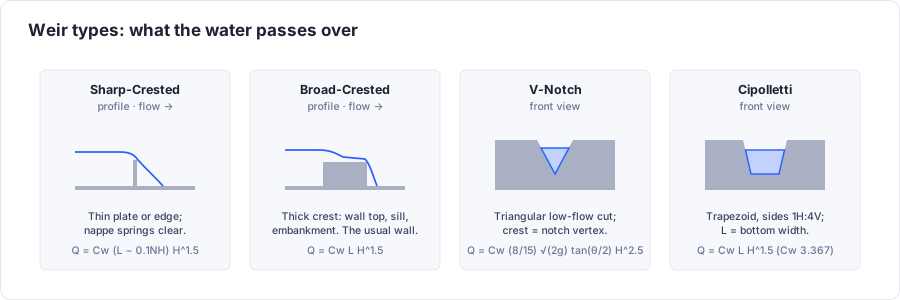
| Type | Use it for | Coefficient and inputs |
|---|---|---|
| Sharp-Crested | A thin plate or edge the water springs clear of: a steel plate bolted to a wall, or a notch whose top is thinner than about half the head. The flow-measurement weir. Rare as a pond’s primary control; typical for a plate weir on an outlet box. | Cw 3.33 (Francis). End contractions: 2 for a notch cut into a wider wall, 1 with one side flush, 0 when the crest spans the full width of the approach. |
| Broad-Crested | A crest thick enough for the flow to ride along it: the top of a concrete wall, a riser rim, a concrete or grassed emergency spillway, a roadway. Crest breadth more than about two-thirds of the head. The usual choice for a concrete outlet wall and for the emergency spillway. | Cw 3.00 default. Published values run 2.6–3.1 for a truly broad crest, rising toward 3.3 as the head grows relative to the crest breadth. 3.00 is the default, the common concrete-wall value. |
| V-Notch | A triangular cut, usually the low-flow stage of a multi-stage wall: it passes small flows accurately where a rectangular notch would be too narrow to build. Extended-detention and water-quality releases. Add a rectangular row above it for the higher stages. | Cw 0.58 for a 90° notch in the form used here (Q ≈ 2.48·H2.5 at 90°). Angles 22.5°–120°, 90° typical. The crest elevation is the notch vertex. |
| Cipolletti | A trapezoidal sharp-crested notch with sides sloped 1 horizontal to 4 vertical. The side slope replaces the end-contraction correction. Mostly a measurement structure; pick it only when the notch really is trapezoidal at 1:4. | Cw 3.367 default (the published value); L is the bottom width. |
A riser weir is a notch cut from its crest to the riser top: Rectangular (Q = Cw × L × H3/2, Cw 3.33 for a thin wall) or V-Notch. It flows as a weir at every head, and its width at the top comes out of the rim's weir length. A plate weir or a trapezoidal notch is a Weir Structure row instead.
5. Exfiltration / Infiltration
Models water leaving the pond through bottom and side infiltration into the surrounding soil using Darcy’s law:
Where K = saturated hydraulic conductivity (in/hr), A = infiltration area, and SF = safety factor.
- Soil Type: select from 11 Green-Ampt soil texture presets (Sand through Clay) to auto-fill the hydraulic conductivity, or choose Custom to enter a value directly.
- Safety Factor is a reduction factor (0–1, default 0.5) that accounts for long-term clogging and compaction.
- Bottom Infiltration uses the pond-bottom area from the elevation-area table, or a custom area override.
- Side-Wall Infiltration is optional. It estimates infiltration through the pond side walls from contour perimeters.
Exfiltration is not available on a pond with a Normal WSEL; OK refuses the combination.
6. User-Defined Stage-Discharge Curve
For non-standard outlet configurations, you can enter a custom elevation-discharge table directly. This overrides the computed stage-discharge from other outlet structures.
- Enter elevation (ft) and discharge (cfs) pairs manually or import from CSV.
- Useful for modeling proprietary outlet devices, vortex valves, or complex multi-stage structures that cannot be represented by the built-in outlet types.
Modified Puls Routing
The primary routing method for ponds. At each time step:
-
Compute the storage indication value:
SIj+1 = Ij + Ij+1 + (SIj − 2Oj) - Interpolate outflow O and storage S from the stage-storage-discharge relationship.
- Track stage, storage, and outflow over the full hydrograph.
The stage-storage-discharge table is computed internally by evaluating all outlet structures at each elevation in the storage table. On a wet pond the table starts at the Normal WSEL, and routing starts there. A routed stage above the top of the table fails the run (see the warning at the end of this page). See the Pond Routing methodology page for full details.
On the pond's Tailwater tab, Use Downstream Element WSE as Tailwater lets a downstream pond or channel submerge this pond's outlets: as the downstream water surface rises during the run, this pond's release is reduced accordingly.
MRM Detention Sizing
When upstream basins use the Modified Rational Method, the pond can perform simplified detention sizing. The detention method, the basin roles and the allowable release are configured on the MRM basin; the pond reports required versus provided storage and checks its outlet against the allowable rate.
Connect the MRM basin to the pond and nothing else. Drain the design-area basins, and any pass-through basins, into the MRM basin rather than into the pond. The Rational method gives peak flows, not hydrographs, so a pond in a Rational network has nothing to route: its storage comes from the MRM basin’s design area. HydraLink does not offer a Rational basin, junction, reach or another pond as something that drains into it, and ponds in series need a unit hydrograph (SCS) network.
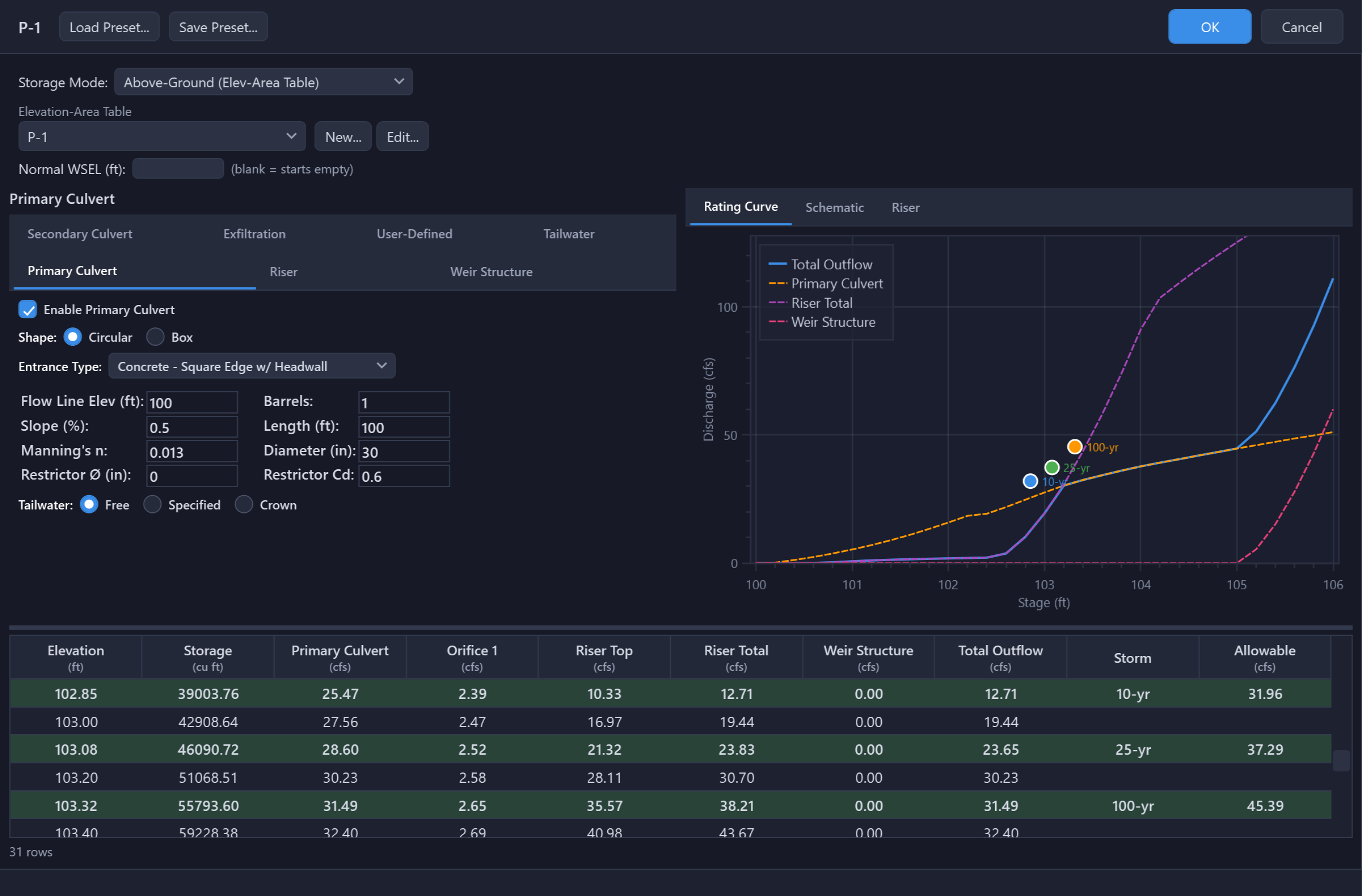
This is where the outlet gets sized. Every storm the MRM basin sized lands on the Pond dialog’s stage-storage-discharge table as a tinted row at its required volume, and as a marker on the rating curve. The row shows the stage the pond reaches for that storm and the release the outlet gives there beside the allowable. Green means the release is within the allowable at that stage, red means it is over. Change the structure until every storm’s row is green; the curve shows which device is doing the work at each stage.
Standard Method
Evaluates the full range of storm durations starting at Tc and reports the critical duration, the one with the largest required storage (Vin − Vout). If the required storage is still rising at the longest duration evaluated, the run log says so. See the Modified Rational Method page for the equations.
Regional IDF Table Method
Uses county- or city-specific coefficients (a, b factors) from the NCTCOG iSWM program (17 DFW-area Texas counties) or the Atlanta Regional Commission Georgia Stormwater Management Manual (16 Georgia cities).
Basin Roles
Basin roles control how each upstream basin participates in detention sizing:
- Design Area
- Post-development area detained by the pond. Its C and area contribute to the composite inflow calculation.
- Target
- Pre-development reference; its peak flow defines the allowable release rate from the pond.
- Bypass
- Flow from the site that does not enter the detention pond. Bypass flow reduces the allowable release from the pond, increasing required detention.
- Pass-Through
- Off-site flow that enters and exits the pond but is not detained. The outfall structure must be sized to convey pass-through flow in addition to the allowable detained release.
Tips & Best Practices
- Always verify the stage-storage-discharge table before running by inspecting the computed outflow at each elevation to ensure outlet structures are behaving as expected.
- Use the Conic volume method for natural ponds with irregular grading. Average End Area is acceptable for rectangular facilities.
- Keep the spillway weir’s crest at or below the top contour; a crest above it is refused (see Outlet Elevations).
- For MRM sizing, drain every basin that reaches the pond into its MRM basin, each with its role assigned.
- When comparing Modified Puls routing to MRM sizing, the Puls method is more accurate but requires a fully defined outlet structure. MRM provides a quick volumetric estimate.
- Ensure the elevation-area table starts at the invert (lowest point) of the pond.
Always verify the stage-storage-discharge table before running a simulation. Inspect the computed outflow at each elevation to confirm that outlet structures are configured correctly and producing expected discharge values.
If the routed water surface rises above the top of the elevation-area table, the run fails with Pond overtopped and the storm’s peak stage. HydraLink cannot say where that water goes, so it reports no number rather than an invented one. Add contours up to the real top of the berm, enlarge the pond, or release more, then run again. For an MRM-sized pond the storage verdict is what blocks (the required volume against the table you drew); the outfall routing check that follows it only warns, since the Modified Rational method computes no attenuation.