Main Window
AutoStyle Studio has three regions: the ribbon across the top, the drawing canvas in the middle, and the property panel on the right. A status bar runs along the bottom.
The Ribbon
Three permanent tabs, plus two that appear only when they apply. The chevron at the right
end of the tab strip pins the ribbon open or lets it auto-hide; when unpinned, clicking a tab
overlays it temporarily and clicking away (or Esc) hides it again.
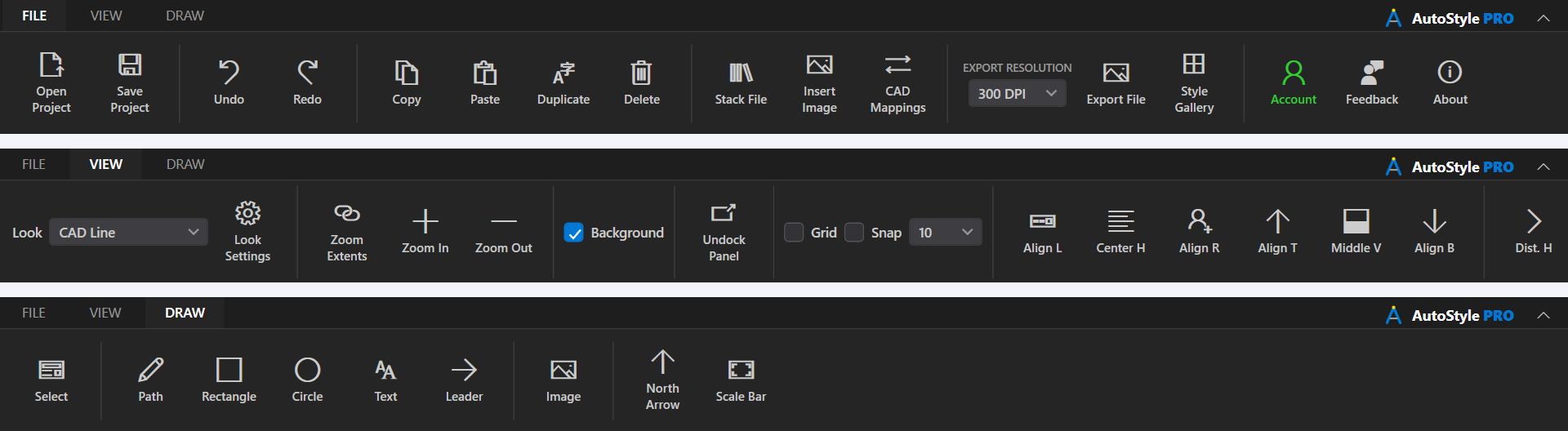
FILE
| Group | Contents |
|---|---|
| Project | Open Project (Ctrl+O) and Save Project
(Ctrl+S). |
| History | Undo (Ctrl+Z) and Redo
(Ctrl+Y), 50 levels deep. |
| Clipboard | Copy, Paste, Duplicate
(Ctrl+D) and Delete. |
| Insert | Stack File to merge another .asp into this one,
Insert Image, and
CAD Mappings. |
| Export | Export Resolution (72, 150, 300 or 600 DPI), PDF layers, Export File, and Style Gallery. |
| Help | Account, Feedback and About. |
VIEW
| Group | Contents |
|---|---|
| Look | The Look picker and Look Settings. |
| Zoom | Zoom Extents (Ctrl+0), Zoom In
(Ctrl+Plus), Zoom Out (Ctrl+Minus). |
| Display | Background toggles the captured paper space background; Undock Panel floats the property panel; Grid, Snap and the grid size (1, 5, 10, 25, 50). |
| Align | Align L / Center H / Align R, Align T / Middle V / Align B, and Dist. H / Dist. V to distribute a multi-selection evenly. |
DRAW
Select, Path, Rectangle, Circle, Text and Leader tools, plus Image, North Arrow and Scale Bar insertion. See Drawing Tools.
TRANSFORM (contextual)
Appears when objects you created are selected. It shows the selection count and gives numeric control the canvas handles cannot: set an absolute rotation, rotate by an increment, ↶90 / ↷90 buttons, and a scale percentage applied to the selection.
EDIT PATH (contextual)
Appears when a path is in edit mode. It steps through segments, shows and edits the start and end coordinates, reports length and bulge, and converts a segment To Arc or To Line.
The Canvas
The canvas shows the sheet at its real paper size, with the page edge drawn. The mouse wheel
zooms toward the pointer, the middle mouse button pans, and Space+drag pans in
any tool. See Canvas & Selection for selection behavior.
The Property Panel
The panel on the right has one tab per kind of thing you can select. Tabs that do not apply to the current selection are hidden.
- Layers and Objects: the scene tree, its toolbar, and the asset library. Always present.
- Fill and Stroke: material, fill, stroke paint, stroke style, stacked stroke layers and shadow, for the selected layer or object.
- Text: content, font, size, alignment, bold and italic, halo or mask, and color. Shown when a text object is selected.
- Leader: the same lettering controls plus arrowhead style and size.
- Image: opacity, blend, width and height with an aspect lock, rotation, pixel and embedded size, and Replace Image. For a Civil 3D surface the tab reads Terrain and adds relief shading, its light and strength, and the elevation tint.
- Plan Object: size and rotation, plus arrow style for a north arrow or drawing scale, segment length and segment count for a scale bar.
The panel can be pulled off into its own window with Undock Panel on the VIEW tab or the button in the panel header, which is useful on a second monitor. Its position is remembered for the session. The splitter between canvas and panel is draggable.
The Status Bar
Left to right: the current zoom percentage, the cursor position in page coordinates, any product notice, and the open drawing's name. A critical notice appears as a ⚠ Notice chip; clicking it re-opens the message. While an export runs, a moving bar after the cursor position names the export, the step it is on and the seconds so far.
Saving
Save Project writes the .asp. Closing with unsaved changes
prompts first. Studio also autosaves every five minutes to
%APPDATA%\AutoStylePro\Autosaves; autosaves are named after the project so two
projects with the same file name in different folders do not collide.