Pipe Table
The Pipe Table provides bulk editing of Manning's n values across all pipes in the network.
Opening the Pipe Table
Open the Pipe Table from Tables menu > Pipe....
Layout
The Pipe Table is grouped by alignment. Each group header shows the alignment name, and the pipes within that alignment are listed beneath it.
| Column | Description |
|---|---|
| Pipe | Pipe name (read-only) |
| Manning's n | Manning's roughness coefficient (editable) |
| Edited | Flag indicating unsaved changes to that row |
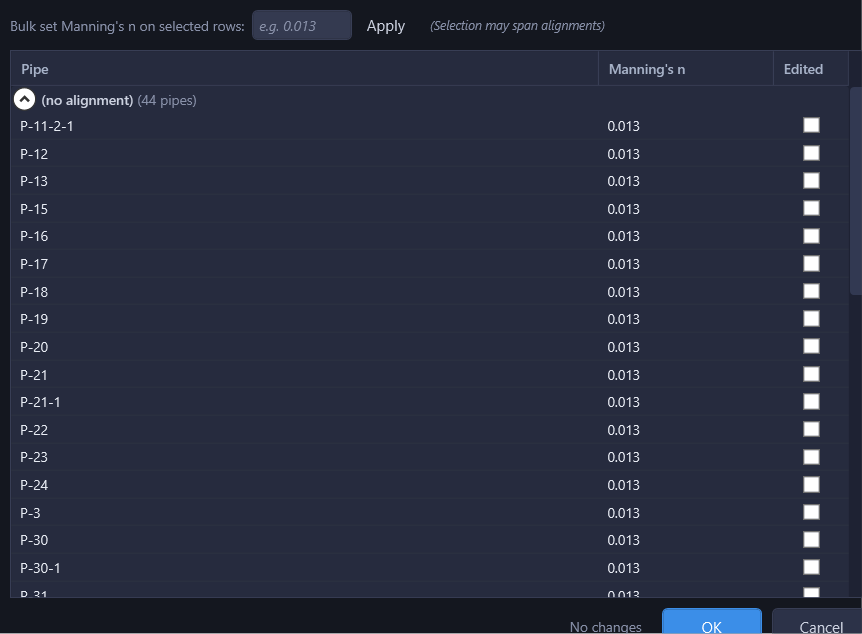
Bulk Apply
To set the same Manning's n value on multiple pipes at once:
- Select the rows you want to update (use Ctrl+Click or Shift+Click for multi-select).
- Enter a value in the "Bulk set Manning's n on selected rows" field.
- Click Apply.
The bulk apply works across alignment groups, so you can select pipes from different alignments and set them all at once.
Workflow
Edit Manning's n values individually or via bulk apply, then click OK to apply changes to the working session. Changes are reflected immediately in the hydraulic calculations. You will see updated velocities, HGL, and capacity results as soon as the Pipe Table dialog closes.
Tip
Use the Pipe Table when you need to set the same Manning's n across multiple pipes (for example, when all pipes in a network use the same material).