Loss Library Manager
The Loss Library Manager lets you browse built-in libraries, create custom libraries, and configure junction loss equations for your projects. Each library contains a collection of loss types that define how energy losses are computed at different structure types.
Opening the Manager
Open the Loss Library Manager by clicking Manage next to the Design standard selector in the Minor Losses Table.
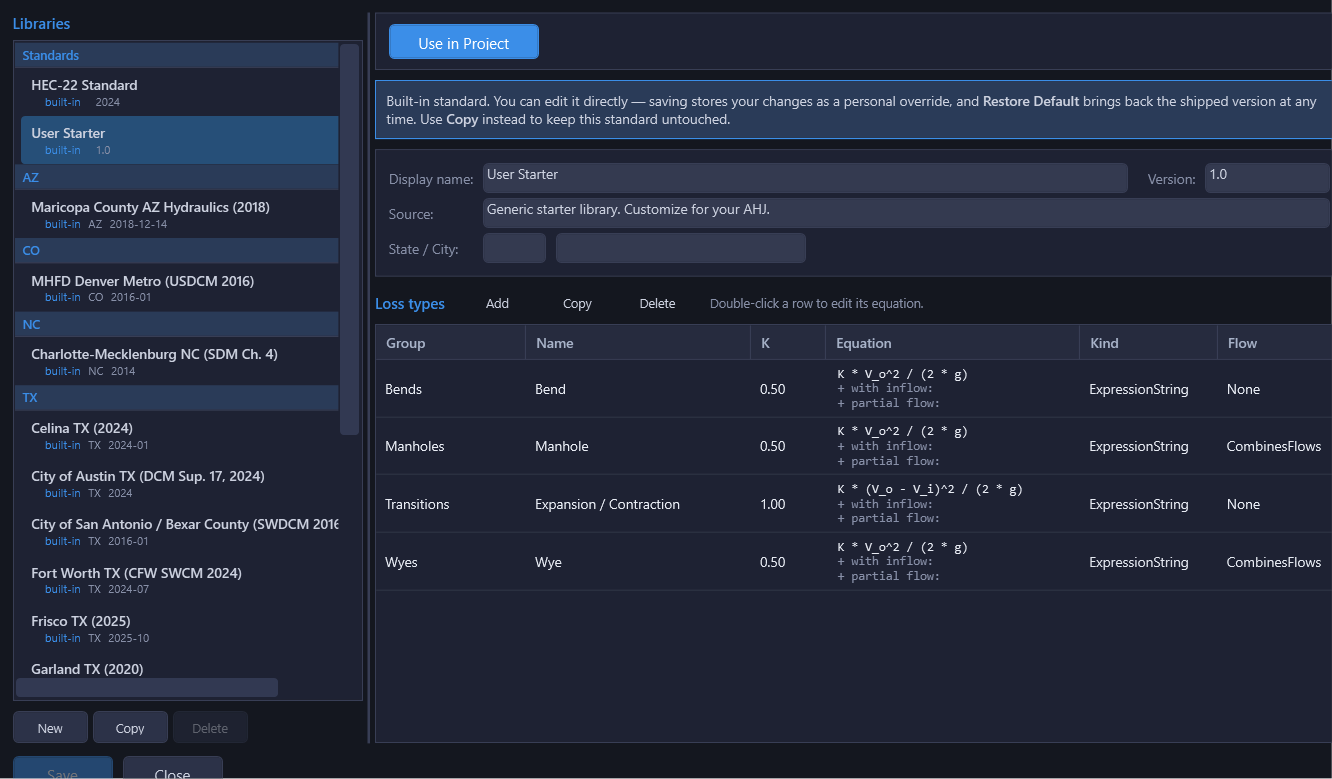
Library List (Left Pane)
The left pane groups libraries the way the manager sees them:
- Standards: built-ins with no assigned state, the User Starter and HEC-22 Standard libraries
- Two-letter state code: every state/municipal built-in groups under the state it applies to (Texas carries the largest set, including iSWM/NCTCOG, which is an NCTCOG document and is grouped under TX rather than Standards)
- User Libraries: libraries you've created new, or created by editing a built-in (see below)
The active library (the one used by the current project) is indicated by a filled circle icon. You can use the Hide/Show toggle to hide built-in libraries you don't use, keeping the list focused on your active libraries.
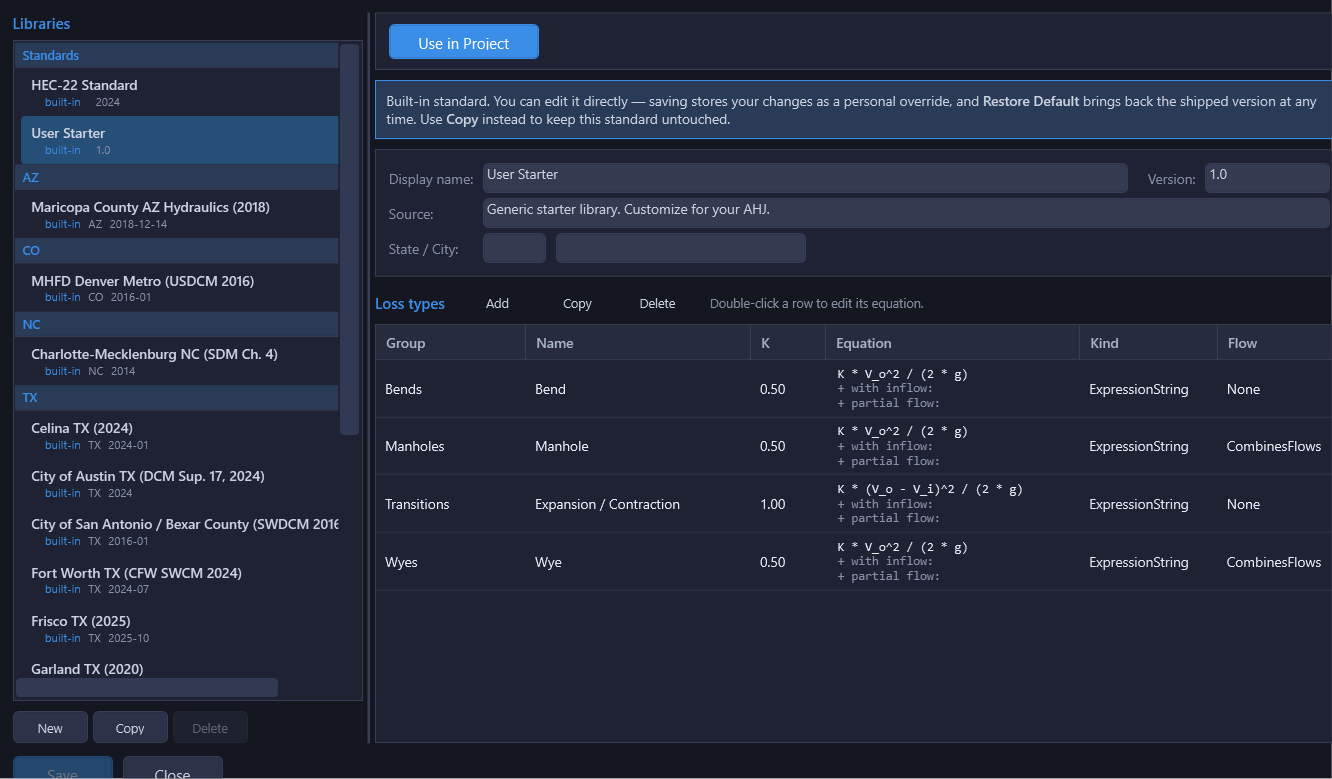
Built-in Libraries
HydraStorm ships with 18 built-in libraries: three general reference standards, described below, plus fifteen state and municipal libraries covering DFW-area cities (Fort Worth, Plano, McKinney, Garland, Round Rock, Grand Prairie, Frisco, Celina), Austin, San Antonio (COSA), TxDOT, Maricopa County AZ, the Denver-metro area (MHFD/UDFCD), Charlotte NC, and King County WA. Don't see one for your jurisdiction? Contact support@bezaleldesignlab.com.
| Library | Description |
|---|---|
| User Starter | Default for new projects. Contains generic loss types with simple K × V² / (2g) expressions. Designed as a template: copy it to create municipality-specific libraries. |
| HEC-22 Standard | FHWA HEC-22 4th Edition (2024, HIF-24-006) §9.1.6.7. Manhole entry uses the 3-step access-hole energy method Eai = max(Eaio, Eais, Eaiu) with corrections per Eq 9.27 and exit loss per Eq 9.31. Bend, wye, transition, and exit entries use expression-based forms of Eq 9.6, 9.9, 9.7–9.8, and 9.5. |
| iSWM / NCTCOG | NCTCOG iSWM 2014. The manhole entry uses the HEC-22 2nd Edition compound K method (K = Ko × CD × Cd × CQ × Cp × CB); iSWM 2014 §1.2.10 reproduces those equations verbatim as Eq 1.36–1.42. Bend/wye/transition/exit entries use expression-based forms of iSWM Eq 1.29, 1.34, 1.30/1.31, and 1.28. |
Library Properties (Right Pane)
When you select a library, the right pane shows its properties and loss types. The properties section includes:
- Display Name: The name shown in dropdowns and the library list
- Source Citation: Reference to the engineering standard or manual the library is based on
- Version: Version number for tracking updates to the library
- State: The state or region the library applies to (optional)
- City: The municipality the library applies to (optional)
- Use in Project button: Activates this library for the current project
Loss Types Grid
Below the library properties, the loss types grid lists every loss type defined in the library. Each type defines:
| Field | Description |
|---|---|
| Name | Descriptive name for the loss type (e.g., "Straight Run Manhole", "90-Degree Bend", "Wye Junction") |
| Group | Category for organization (e.g., "Manhole", "Bend", "Wye", "Inlet") |
| K | Base loss coefficient used in the expression via the K variable (or the fallback K when a Kj lookup table doesn't resolve) |
| Equation | Read-only in the grid: the primary expression, plus the with-inflow and partial-flow override expressions on their own lines underneath when set. Double-click the row to edit any of them in the Equation Editor. |
| Kind | One of three computation methods: ExpressionString (user-authored formula), Hec22EnergyLoss2ndEd (compound K method, also used by iSWM/NCTCOG), or Hec22EnergyLoss4thEd (3-step access-hole energy method). See Junction Losses for details. |
| Flow | Flow behavior at the structure: None (through-flow, e.g. a bend) or CombinesFlows (a wye, manhole, or other structure where inlet flows merge) |
Editing a Built-in Library
Every field in a built-in library is directly editable. There's no separate read-only mode. Change a K value, edit an expression, add or remove a loss type, and click Save: the edit is written as a personal override that shadows the shipped default from then on, in this project and every other project that uses that library id. A banner across the top of the properties pane tells you which state you're in:
- Built-in, unmodified: an info banner notes that editing will create an override.
- Built-in, overridden: a warning banner notes your changes are shadowing the shipped default, with a Restore Default button that discards the override (after confirming) and reverts to the embedded content.
Because an override is per-user, not per-project, think twice before editing a built-in you also use unmodified elsewhere. If you want to keep the original intact and build a distinctly-named variant instead, use Copy (below) rather than editing in place.
Creating a Custom Library
There are two ways to create a custom library:
Option A: Copy from a Built-in Library
- Select the built-in library you want to start from in the library list.
- Click Copy. A new library is created with all the loss types from the original, under a name you choose.
- Edit the library properties: update the name, citation, state, and city to match your jurisdiction.
- Modify the loss types as needed: adjust K values, edit expressions, add new types, or remove types that don't apply.
- Click Save.
Option B: Create a Blank Library
- Click New to create an empty library.
- Fill in the library properties (name, citation, etc.).
- Add loss types by clicking the add button in the loss types grid.
- Configure each loss type's name, group, K value, equation kind, and expression.
- Click Save.
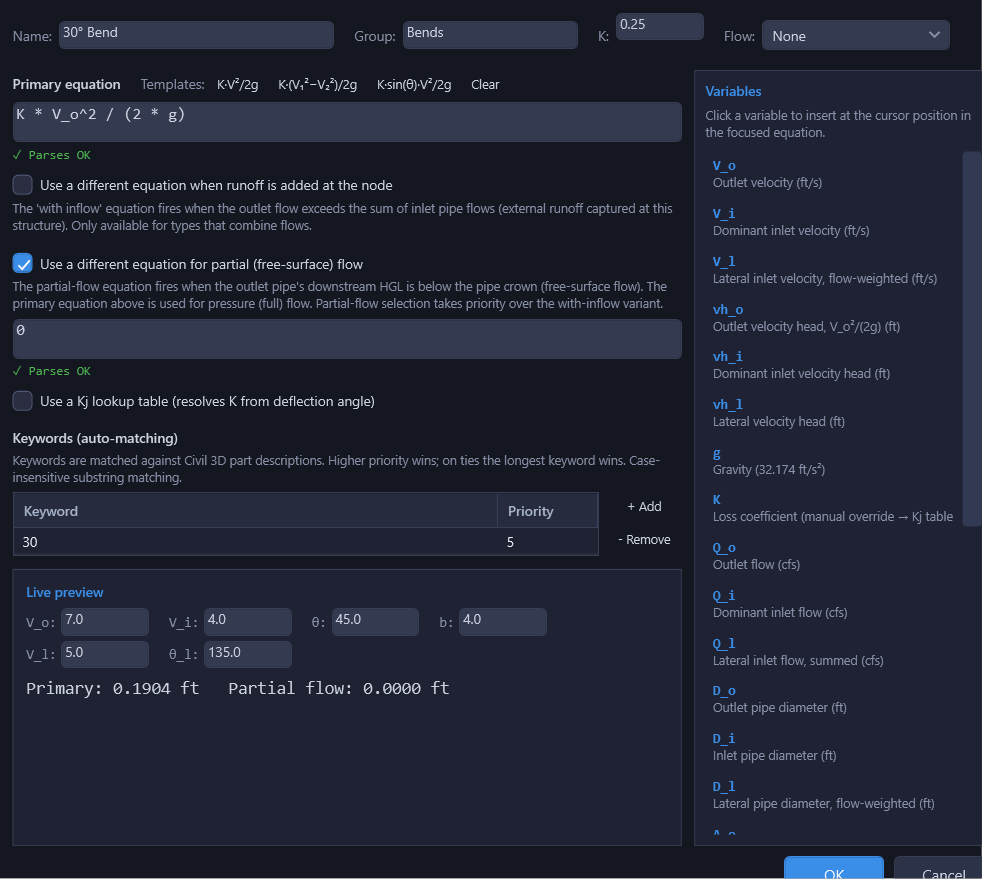
Equation Editor
Double-click a loss type (or select it and click Edit) to open the Equation Editor. This provides a dedicated interface for authoring and testing loss expressions.
The editor includes:
- Primary equation: the Kj formula, with template buttons for common forms (velocity head, delta-velocity-head, angle-dependent bend) and Clear
- With-inflow / partial-flow overrides: optional secondary expressions, each behind its own checkbox, that take priority over the primary equation under the conditions described in Junction Losses
- Kj lookup table: an optional (angle, K) table with Nearest or Linear interpolation, a Test θ field that previews the resolved K for any angle, and an "+ Add" / "− Remove" row editor. See Junction Losses for when to use a table instead of a formula.
- Keywords (auto-matching): the list of keywords and priorities that drive suggestion matching for this loss type, editable right alongside the equation
- Variable palette: reference panel showing all available variables with descriptions, so you don't have to memorize variable names
- Live preview: enter sample variable values and see the expression evaluate in real time, to verify it produces the expected result before saving
Getting Started with Custom Libraries
- The User Starter library is the best starting point for creating municipality-specific libraries. It contains simple, generic loss types that are easy to understand and modify.
- Copy the User Starter, rename it for your jurisdiction (e.g., "City of Dallas Standards"), and adjust the K values and expressions to match local design criteria.
- If your jurisdiction follows HEC-22 or iSWM, consider copying the corresponding built-in library instead, since the equations are already configured and you may only need to adjust a few parameters.
- Remember that deflection angles are stored per-structure, not per-library. You only need one "Bend" loss type that uses the
thetavariable, not separate entries for each angle.