Hydrology Table
The Hydrology Table configures design flows and basin parameters for every structure in the network.
Opening the Hydrology Table
Open the Hydrology Table from Tables menu > Hydrology.... A description of the active hydrology mode is shown at the top of the dialog.
Storm Selector
When more than one storm event is configured, a Storm dropdown at the top of the table lets you pick which storm's flow is shown/edited (Peak Flows Only mode) or which storm's IDF data drives the displayed computed flow (rational modes). The single peak-flow column's header updates to name the selected storm's return period and role: for example "10-yr Q (Design)" or "100-yr Q (Check)", not a fixed "Design Q" / "Check Q" label.
Manual Basins… button, next to the storm selector, opens a separate dialog for creating, editing, or deleting hand-made drainage basins and assigning them to structures. This is useful in HydraLink mode for a sub-area the import doesn't carry, or in Manual mode for a basin you want to track and re-assign independently of the node's own C/A/Tc. It's available whenever the project's hydrology mode supports basin assignment.
Peak Flows Only Mode
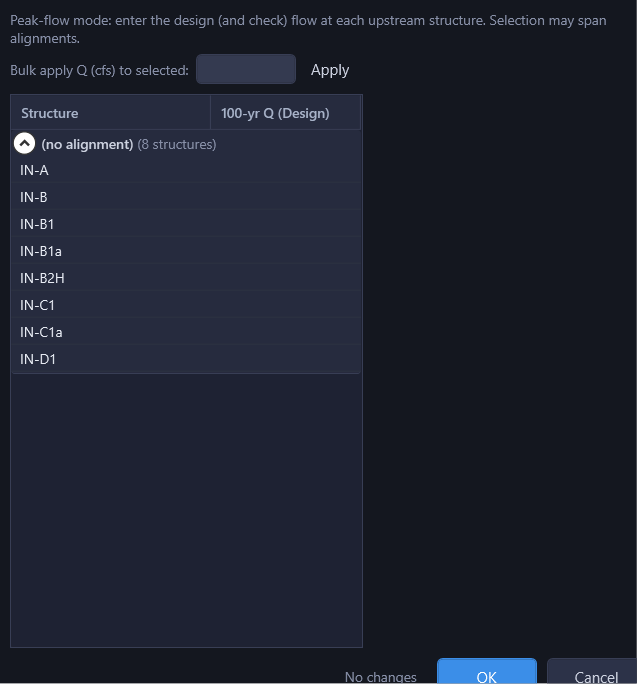
When the project is set to Peak Flows Only hydrology mode, the Hydrology Table displays a simple grid for direct flow entry.
| Column | Description |
|---|---|
| Structure | Node name (read-only) |
| {N}-yr Q (Design) / {N}-yr Q (Check) | A single peak-flow column, editable. Its header names the selected storm's return period and role (e.g. "10-yr Q (Design)", "100-yr Q (Check)") based on the Storm selector above; it is not two separate columns. |
Enter peak flows directly into each row. A bulk-apply row is shown at the top in this mode: enter a value in "Bulk apply Q (cfs) to selected" and click Apply to set every selected row at once.
Manual Mode
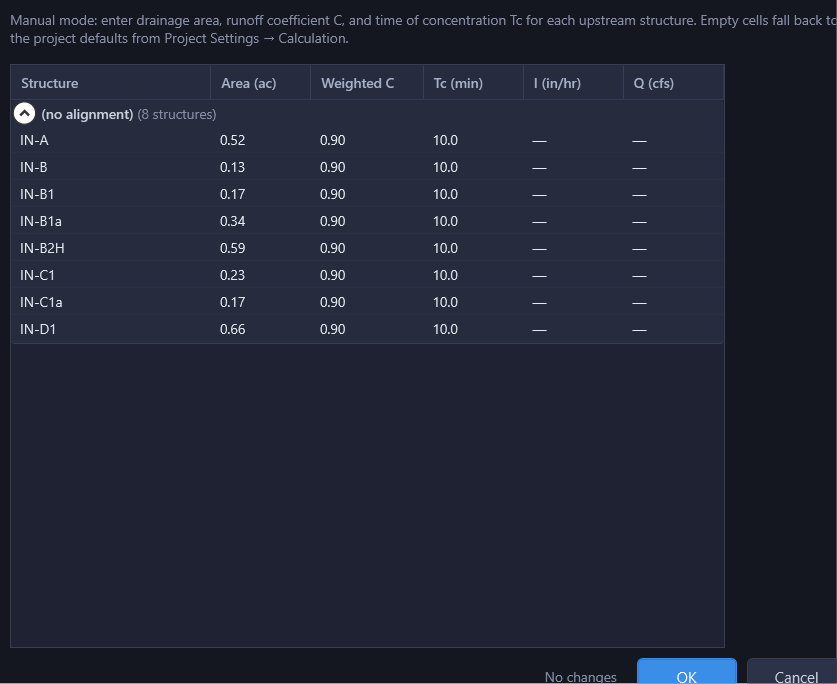
In Manual mode, the peak-flow column is hidden. Instead, Area (ac), Weighted C, and Tc (min) become directly editable per node, and I (in/hr) and Q (cfs) are computed and shown read-only from the project's IDF data. Hand-created basins can still be assigned to a structure here; a structure that owns basins takes its A / C / Tc from them and those three cells grey out.
The computed Q column is the whole story in this mode: a flow typed anywhere else in the project contributes nothing, because the rational accumulation is pure ΣCA. If a structure still carries a flow from an earlier Peak Flows Only design, HydraStorm names it in a calculation warning; the value is ignored either way. To actually remove it, switch the hydrology mode to Peak Flows Only temporarily, blank the flow cell here, and switch back. The flow column is hidden in Manual mode, so the leftover can't be cleared without the round trip. See What Enters the Rational Accumulation.
Leaving Weighted C or Tc blank on a structure that has area doesn't leave it unpriced: HydraStorm fills it with the project default from Project Settings > Hydrology and names the structures and the default used in a calculation warning, so a defaulted value never reads as a considered entry. See Blank C or Tc uses the project default on the Rational Method page.
HydraLink Mode
In HydraLink mode, the table shows an Assigned Basins column (a checklist dropdown of external basins contributing to that node). Area (ac), Weighted C, and Tc (min) are shown but are read-only here: they're the sums/weighted values computed from the assigned basins, not directly editable. I (in/hr) and Q (cfs) are also read-only.
What the peak-flow column does depends on the link's Import Basis:
- Basin Parameters basis: the peak-flow column is hidden. Q is computed from the assigned basins, and imported flows do not drive the network.
- Peak Flows basis: the peak-flow column appears, showing the routed flow imported for the selected storm at each structure, so you can review and, if you must, adjust the number the network actually runs on.
| Column | Description |
|---|---|
| Structure | Node name (read-only) |
| Assigned Basins | Multi-select checklist for basin assignment (HydraLink and Manual modes) |
| Area (ac) | Drainage area in acres. Editable in Manual mode; read-only (basin sum) in HydraLink mode. |
| Weighted C | Runoff coefficient. Editable in Manual mode; read-only (basin-weighted) in HydraLink mode. |
| Tc (min) | Time of concentration. Editable in Manual mode; read-only (basin max) in HydraLink mode. |
| I (in/hr) | Rainfall intensity looked up from the project's IDF data at this node's Tc (read-only, all rational modes) |
| Q (cfs) | Computed rational-method flow, Q = C×I×A (read-only, all rational modes) |
Basin Assignment
In HydraLink mode, the Assigned Basins column shows which external basins contribute to each node. Basin assignment follows these rules:
- Multiple basins to one inlet: When multiple basins are assigned to a single inlet, HydraStorm computes a weighted runoff coefficient (C), takes the maximum time of concentration (Tc), and sums the drainage areas.
- One basin per inlet constraint: A single basin cannot be assigned to multiple inlets. Checking a basin that is already assigned to a different structure in this table moves it there immediately, with no confirmation prompt. The checklist entry names the other structure first (“Basin-3 (at MH-12)”) so you can see where it currently lives before you check it. This is looser than the Basin Assignment dialog, which asks first and names both structures. Use that dialog instead when you want the confirmation step.