HydraLink Integration
HydraStorm's companion application HydraLink provides stormwater hydrology modeling including rainfall-runoff analysis, detention pond design, and culvert analysis. Import HydraLink results directly into HydraStorm to drive your storm drain hydraulic design.
Supported File Types
| Extension | Description | Contents |
|---|---|---|
.hyd |
HydraLink native project file | Basins, junctions, ponds, storm events, full model definition |
.hlresults |
Pre-computed results export | Peak flows, outflows, volumes, stages |
HydraStorm reads exports from current and earlier HydraLink versions.
Setup
- Set the hydrology mode to HydraLink in Project Settings > Hydrology.
- Browse to the HydraLink project (
.hyd). A project linked to a.hlresultsby an earlier version keeps working. - Select a Plan, directly under the file path, if the
.hydfile contains multiple plans. Flows are computed as soon as you pick one. See One project, several drawings below. On a multi-plan file the choice is yours to make, and each plan is listed with the drawing it was authored in. - Click Import Flows to match basins to structures and pull in the flows the plan's results publish. On the Basin Parameters basis the same button reads Compute Flows and previews flows computed from the
.hyd's inputs instead. Picking a plan runs the button for you as soon as you pick it, so there's nothing more to click. - Under the plan picker, a line names the results file the plan reads, with its solve time and whether it is a routed solve or rational-only. HydraLink publishes a plan's results as
<hyd name>_<plan name>.hlresultsbeside the.hyd(palette save) or beside the plan's.hlparcels(desktop solve), or to the path set in HydraLink's CAD Link Settings; a file only counts if it names that plan. If there is none, the line reads in gold why: not yet published, the file there holds another plan's results, or it could not be read.
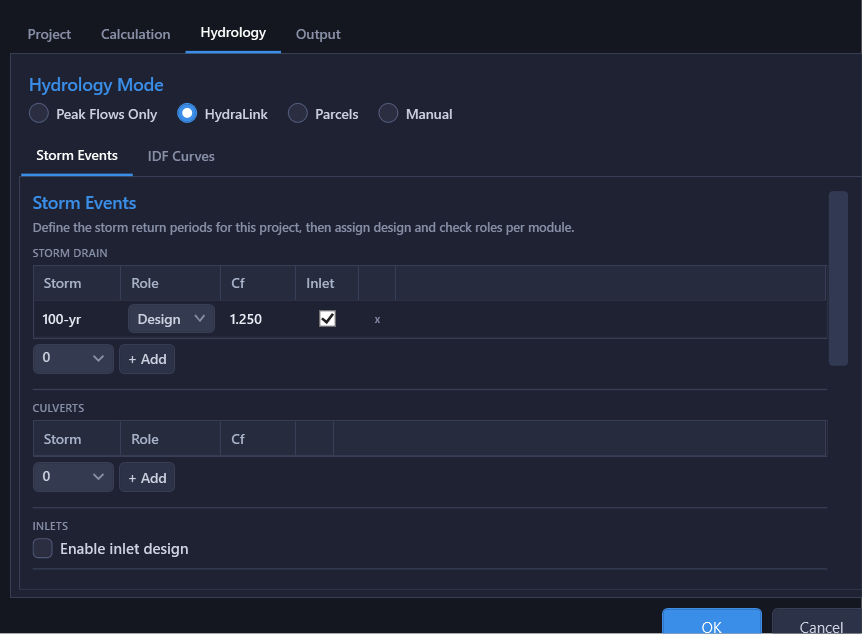
There is no storm to pick here. On the Peak Flows basis, every storm the plan's results publish is imported at its own return period, and the grid shows one Q column per storm. Which storms are analyzed is set where each module's storms are set: the Storm Drain, Culvert and Inlet storm lists. Linking adds every storm the file publishes to the Storm Events list on the Hydrology tab, each time the file is loaded, so each one can be added on those tabs. That list's Source column says which storms the file publishes. A storm HydraLink did not model (a 500-year overtopping check, say) can still be added there: it reads Not in HydraLink, takes a Cf you enter, and its flows are entered on the results grid. A storm the file stops publishing stays on the list and on every tab that analyzes it, and the settings panel warns that the file has no flows for it. On the Basin Parameters basis the grid previews flows computed from the .hyd's inputs rather than published results. To change a flow for one storm, enter it on the results grid with that storm selected.
One project, several drawings
A single HydraLink project can be fed by more than one drawing: a pre-development condition modelled in one and the post-development condition in another, both saved into the same .hyd. Each plan is therefore listed with the drawing it came from, reading as Post-Development (DRAINAGE.dwg), so you can tell two conditions apart without opening anything. That matters under the usual phase-folder convention, where the pre and post drawings often share a file name and differ only by folder.
If the file names an active plan, that plan is selected for you. If it carries several plans and names none of them, nothing is selected and the panel says so. Pick the plan this storm system is designed for. Check it against the drawing name before you import: a pre-development plan carries lower flows, and a storm drain sized from one would be undersized. The import button stays disabled until a plan is picked, and picking one computes the flows. A file with a single plan is selected automatically.
Import Basis
A HydraLink link can supply two different things, and they are mutually exclusive. Choose between them with the Import Basis radio pair in the HydraLink Integration block of Project Settings > Hydrology:
This page calls the second one Peak Flows, matching the radio label. Some calculation warnings and prompts still call it Fixed Flows, the same basis under its older internal name.
| Basis | What the link supplies | How Q is computed |
|---|---|---|
| Basin Parameters (C·A·Tc) | Drainage area, runoff coefficient C, and Tc per matched structure, plus the IDF data | HydraStorm runs its own rational accumulation: Q = Cf × ΣCA × I, with Tc accumulated along the drawn pipe network. Imported peak flows do not enter it. |
| Peak Flows (HydraLink's flows) | HydraLink's published peak flows, including routed pond outflows where the model has them | The imported flows drive the network directly and accumulate downstream. No rational accumulation runs, and no IDF data is required. |
When the choice is made for you
The linked file decides the basis whenever only one of them is defensible; the radios lock and a line beneath them explains why:
- The routed model contains ponds → Peak Flows is forced. A pond attenuates flow, and no basin-parameter accumulation can reproduce a routed outflow, so only the solved numbers are valid downstream of storage.
- The model sizes detention with no pond below it → Peak Flows is forced, for the same reason. A HydraLink Modified Rational element is storage being sized: it passes no flow downstream on its own, and only a pond linked below it determines what leaves. See Detention with no release.
- The selected plan has no published results → Basin Parameters is forced: there are no flows to import until HydraLink solves or saves the plan. The line under the plan picker says why, in gold.
- A plan with published results and no reachable ponds (routed or rational-only) → either basis is valid and the choice is yours. Basin Parameters lets HydraStorm re-time the flows along the pipe network you actually drew; Peak Flows keeps HydraLink's numbers verbatim.
Which one your project wants
On the Basin Parameters basis a structure's Q is re-derived from the accumulated ΣCA at that structure's system Tc, the longest travel time reaching it. Where two basins with different Tc meet, the shorter basin's area gets priced at the longer basin's (lower) intensity, so the combined Q is less than the sum of the two basins' published peaks. That is the rational method behaving correctly: two peaks that arrive at different times do not add.
On the Peak Flows basis nothing is re-priced. Each basin's published peak enters at its matched structure and the peaks simply add downstream, so every structure's Q is still the number on the HydraLink drainage-area map. That sum is the conservative envelope of the re-timed result; it is never smaller. Both accountings are in common use; pick the one your reviewer expects, and be aware that switching bases changes computed flows throughout the network.
A rational-only export (for example, one published by HydraLink's Civil 3D palette) supports both bases. What it lacks is routing, not flows: it publishes a peak per basin either way. A structure fed by something the drawing models as a pond or culvert therefore receives that element's inflow on either basis, un-attenuated, and HydraStorm flags this on the file and on the affected rows. Solve and re-export in HydraLink when you need attenuated numbers.
On the Basin Parameters basis, any peak flow that an earlier import (or an earlier Peak Flows Only design) left on a structure is excluded from the calculation and named in a warning. See What Enters the Rational Accumulation.
When the model starts or stops attenuating
A pond and the rational accumulation cannot coexist: storage attenuates flow, and ΣCA does not. If a re-published .hyd or .hlresults now routes flow through a pond that this network continues below, and the project is running on Basin Parameters, HydraStorm does more than warn: it refuses to calculate at all until the basis changes. A pond the storm drain only discharges into at its outfall, with nothing modelled downstream of it, does not trip this.
- A pond with network below it appears: HydraStorm names it and asks you to convert the link to Peak Flows. Declining leaves the project in a state HydraStorm will not compute (not just "unattenuated," but blocked) until you convert the basis here or switch the whole project to Peak Flows Only and enter the flows by hand. Revisit the Import Basis in Project Settings if you change your mind.
- The last such pond disappears from a project running on Peak Flows: HydraStorm offers a return to Basin Parameters. Staying on Peak Flows is equally valid, so this one is only ever an offer.
Accepting either prompt converts the basis and recalculates immediately.
Routed pond outflows
On the Peak Flows basis, a structure matched to a HydraLink pond is treated as the pond's outlet. Its routed outflow replaces the flow arriving from upstream instead of adding to it, because the routed outflow already accounts for everything draining into the pond. The replacement is made storm by storm. A storm the file has no pond outflow for takes no attenuation credit, so at that structure its flow adds to the arriving flow instead, which is conservative.
Whenever the credit is taken, HydraStorm reports it as an Info message on that structure, for example:
'POND-A OUT': routed pond outflow 12.40 cfs replaces the 31.80 cfs arriving from upstream (attenuation credit). Confirm the HydraLink model includes every tributary connected to this structure in the drawing.
Read that message as a prompt to check the two models agree: if a lateral exists in the drawing but not in the HydraLink model, its flow disappears below the pond and nothing else would tell you.
A pond is two structures
A pond breaks the network. The storm drain discharging into it ends at a headwall or outfall structure at the pond; the outfall pipe below it starts at the outlet control structure. Those are two structures and two sub-networks, and HydraStorm calculates disconnected sub-networks independently, so 50 cfs arriving and 30 cfs leaving never accumulate across the storage, which is right, because they are not the same water event. Draw it that way and there is nothing else to configure.
Drawing the pond as a single pass-through structure connects two systems that are not connected, and three things go wrong at once:
- the arriving flow is summed with the routed outflow, double-counting the whole basin above the pond, unless the link is on the Peak Flows basis, where the routed outflow replaces it;
- the HGL propagates straight through: the outfall pipe's backwater climbs into the incoming trunk instead of that trunk ending at the pond's water surface. This one is wrong even when the flows come out right, which is why it is reported in every hydrology mode;
- in a rational mode the upstream ΣCA passes through un-attenuated, so every structure below the pond is priced on the full upstream drainage area.
HydraStorm reports this as a Network Issues row the moment the network is read, not just as a calculation warning: it is a drafting fault, and the fix is the drawing rather than a setting. The calculation adds the numbers behind the double count so you can see which part of the total is counted twice.
Ponds in a plan with no routed solve
Basin Parameters is forced whenever the selected plan has no published results yet (the line under the plan picker says why, in gold), and it stays open to you when the plan's only results are rational-only, which carry no routing. If the plan contains a pond this network continues below and the project is on Basin Parameters, HydraStorm refuses to calculate rather than pricing every structure below it on the full, un-attenuated upstream drainage area: Basin Parameters has no way to route flow through storage. A pond the drawing only discharges into at its outfall, with nothing modelled downstream of it, is not refused.
The remedy is never to delete the pond: the storage is real, and hiding it from HydraStorm would just move the error into the design instead of the software. Solve the plan in HydraLink (a routed solve). HydraStorm finds the results HydraLink publishes for the plan (see the Setup steps above) and reads the pond's routed outflow from them. Press Reload in Project Settings (or reopen it) and the import basis moves to Peak Flows. Failing that, switch the project to Peak Flows Only and enter the flows by hand.
Culverts are not treated this way. A culvert is steady conveyance with no storage, so it earns no replacement credit: its routed flow is imported as an ordinary local inflow and accumulates with whatever arrives in pipes. That is only correct when the culvert's tributary system is not also drawn in the HydraStorm network: a mid-network structure matched to a HydraLink culvert would carry both the culvert's routed flow and the same water arriving through the upstream pipes, counting it twice. Match culverts where they bring outside flow into the system, not where they sit inline on pipes you are designing.
Detention with no release
A HydraLink Modified Rational element is detention being sized rather than routed. It passes no flow downstream on its own: only a pond linked below it determines what leaves the storage. Link one to a pond and the model has a routed release like any other, and everything under Import Basis above applies unchanged. Linked or not, the element itself is never offered as an assignable basin; see Basin Assignment.
An MRM element with no pond below it is the case to know about. The storage is real and it attenuates, but nothing in the model computes a release for it, and the peak HydraLink publishes for that element is the undetained flow, which is the number an import would otherwise carry straight into your pipes. So it is treated as storage: if this network continues below it, Peak Flows is forced and the rational accumulation is refused, exactly as for a pond.
The remedy is not the one a pond gets. A pond's routed outflow is already sitting in the solved results once HydraLink solves the plan, and HydraStorm finds and reads them automatically. An unlinked MRM element's release is not in that file and re-solving will not put it there. There is nothing yet to solve. Link the element to a pond in HydraLink, solve, and export; or switch the project to Peak Flows Only and enter the release by hand. As always, deleting the detention is never the answer.
On the Peak Flows basis the project still calculates, and a warning names the element on every run: the flow it contributes is undetained, so the pipes below it take no attenuation credit. Those pipes are conservative (sized as though the detention you have drawn and paid for were not there) until the element is linked to a pond and the model carries a real release.
What an import may overwrite, and what it may not
An import lands flows for every storm the linked file publishes, not just the design and check pair. A storm that drives a published number (the storm drain design or check storm, a culvert or inlet module storm, or any analysis storm) always goes through the same per-structure review dialog, and so does any storm whose slot already holds a different value, whether or not anything computes it yet. A number somebody typed is never overwritten without being shown first. What is left is genuinely inert: it lands quietly and the status line names the storms (“also stored 10-yr, 50-yr for later use”).
Unchecking a row in that dialog keeps the structure's current flow and its current pond designation. Declining an update and then having the structure re-labelled as a routed pond outlet would change how the flow you kept accumulates, which is not what declining means.
A re-import also reports what it lost. An element that has disappeared from the linked file, or that is still in the file but no longer matches a structure, is listed by name: its structure keeps the flow from the last import, and without the notice nothing would ever say why it stopped updating.
The same goes for a storm the file stops publishing. If HydraLink later drops the 25-year event, the review shows a row for that storm reading “no longer published” on every structure still carrying a 25-year flow, and offers to clear it. That row is the one row in the dialog that arrives unchecked: keeping a number is the safe direction, and the point is to tell you the flow has stopped being refreshed, not to delete it for you. This matters most when a culvert or inlet module runs that return period: it would go on computing with the stale value with nothing able to say so.
These rows need an earlier results import made with a current HydraStorm to compare against. A project saved by an older version proposes none until you import a results file again, and a .hyd link never proposes them.
How Flows Are Matched
HydraStorm places HydraLink elements on structures by location, never by name. A basin goes to the structure closest to the marker you placed for it in HydraLink's Civil 3D palette, within the search radius you set in Project Settings (default 5 ft). Junctions and ponds placed as blocks in the drawing go to the structure at the block. Names are not used, so a basin called "B3" lands on the structure you marked even when a lateral named "B3" runs elsewhere.
A basin with no marker is not matched. Its row in the review grid says so: place a marker in HydraLink on the structure the basin drains to, or assign the basin by hand in Basin Assignment. A marker with no structure within the radius leaves the basin unmatched too, and the review grid says how far away the nearest structure is so you can move the marker onto it. Files exported by a HydraLink too old to write markers match no basins.
Every import places the elements afresh from their markers and blocks, so moving a marker in HydraLink moves the basin. When an element lands somewhere different from last time, the review grid names the structure it was on. Your Use choices carry forward. Check the review grid for any match that looks wrong before you apply it.
HydraLink Modified Rational elements are not listed. They size detention storage, and the peak HydraLink gives them is the undetained flow (see Detention with no release). If an earlier import applied one to a structure, the review names it: that structure keeps the flow until you correct it on the results grid.
Shared Inlets: Several Basins, One Structure
Two or three drainage areas often discharge to the same curb inlet. You can model that in HydraLink's Civil 3D palette by marking each of those basins at that one inlet, instead of adding a junction whose only job is to say they meet there. HydraStorm lands in the same place either way: the basins accumulate at that structure exactly as a junction would, with areas summed, C area-weighted, the longest Tc governing, and their published peaks added.
Marked basins can share an inlet: each one lands on the structure you marked it at, and a second basin marked there joins it. A basin you have not marked is not matched at all. Either way the review grid tells you what happened before anything is applied: a shared inlet reads "Shares 'CI-1' with 'A', 'B'".
Two limits worth knowing. A basin never joins a structure already matched to a junction or pond, because that element's accumulated or routed flow already accounts for the same water. And in Rational (Basin Parameters) mode the structure is re-priced from the combined area, weighted C, and Tc at the system's time of concentration rather than adding the published peaks, the same difference you already get at a junction and generally the smaller number.
Marking basins requires a current HydraLink.
Basin vs Junction Intelligence
HydraLink models often include both basins (drainage areas) and junctions (confluence points that accumulate basin flows). When a junction is matched to a structure, each of its member basins is suggested at that structure, labelled via the junction, and you accept them the same way you accept any other suggested basin (see HydraLink Junction Intelligence). Because each basin can only be assigned once, the same watershed cannot be counted both through the junction and through a member basin. The result at the structure is identical to assigning the basins one at a time: summed area, area-weighted C, and the largest Tc.
Flow Sources
What a matched structure receives depends on the kind of HydraLink element it matched:
| Element Type | Flow It Contributes |
|---|---|
| Basin | Peak runoff from the drainage area |
| Pond | Routed outflow after detention |
| Culvert | Outflow from the culvert analysis |
Live Sync & Flow Review
Once a linked .hlresults file has been imported at least once, HydraStorm keeps watching it on disk. When you recalculate in HydraLink and it re-publishes the file, HydraStorm reads the update automatically and works out what changed at each matched structure before touching any node.
Reviewing the update
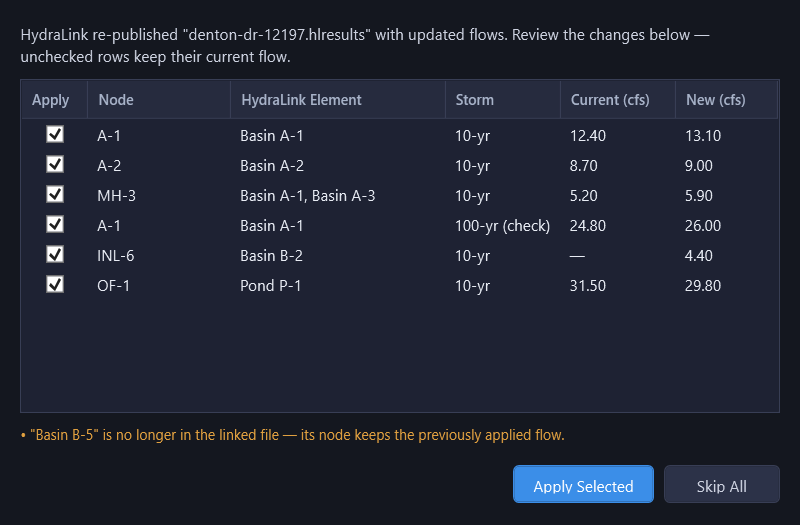
If flows changed, HydraStorm opens the HydraLink Flow Update dialog listing every affected node/storm combination: the node name, the HydraLink element(s) feeding it, the storm (return period, with "(check)" for the check storm), the current flow, and the new flow. Each row has an Apply checkbox, checked by default.
- Click Apply Selected to accept the checked rows. HydraStorm updates the design and/or check flow on those nodes and recalculates.
- Click Skip All (or close the dialog) to leave every node flow exactly as it was. You can still reload manually from Project Settings later.
Flows that didn't change are never listed, so on a large project you only review real deltas. If a previously matched HydraLink element is missing from the new file (renamed, deleted, or dropped from the plan), it's called out below the table: the node it was feeding keeps its last-applied flow until you resolve it.
What triggers it
Live sync applies to a linked .hlresults results export once you've matched at least one flow from it. A linked .hyd project file is watched too. HydraLink computes basin and junction hydrology locally from that file rather than exporting pre-computed flows, but HydraStorm notices when the .hyd changes on disk and opens the same review dialog described above for the values you have imported from it, including any pond the change adds or removes (see Import Basis).
If none of the storms in the file match your project's design return period, HydraStorm shows a status bar message describing the issue instead of opening the review dialog. The check is against the design period only, even when a check storm is configured.
When the file says it is out of date
HydraLink marks a results file as not current when its own model has moved past the numbers in it: inputs were edited after the last solve, or a solve did not complete and the file kept the previous run's numbers. Either way the flows are the last full solve HydraLink finished, and its model no longer matches them.
HydraStorm never applies such a file silently. Project Settings names it beside the file path, and a re-published one proposes no flow changes at all: yesterday's solve is not offered as an update. Beyond that, the fact stays with the project: a warning naming the solve date appears on every calculation, for as long as the project is computing with those numbers. Import a current file and it clears itself; there is nothing to dismiss.
It is a warning rather than a refusal, because the numbers are often fine: adjusting a Tc in HydraLink after solving leaves a not-current file and perfectly good flows. What it protects against is the other case. A pond that has started overtopping since the last successful solve releases more than the number in the file, so the pipes and headwall below it would be sized on a release the design no longer produces, and nothing else about the file would look unusual. Re-solve in HydraLink and re-import before relying on the flows.
Provisional flows from the Civil 3D palette
HydraLink's Civil 3D palette can publish flows when you save a .hyd, so you can reach HydraStorm without waiting for a desktop solve. Those flows are provisional: they are Rational peaks with no routing anywhere. A node the drawing marks as a pond or culvert arrives as an ordinary junction carrying its inflow, not the attenuated outflow a routed solve would produce, so any inlet fed by one is overstated by exactly the attenuation the pond exists to provide.
HydraStorm labels these files wherever they appear. Project Settings shows the source alongside the plan and solve time, and the flow update dialog carries a banner above the grid:
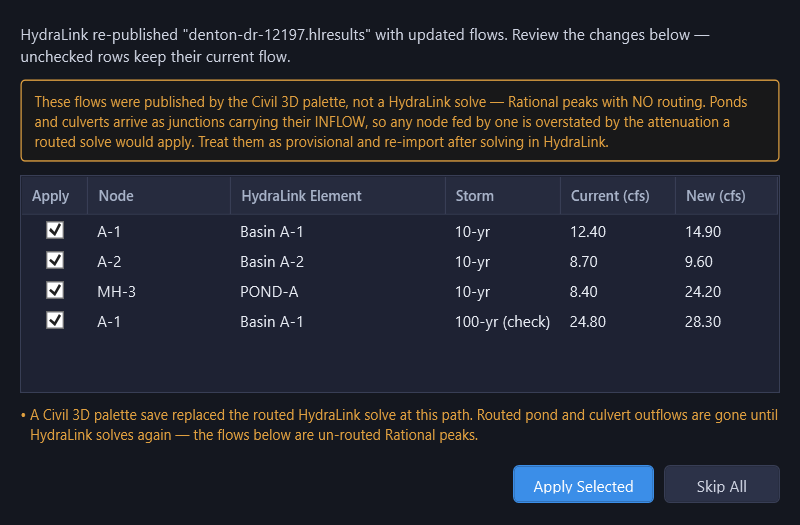
The flows are still usable, and applying them is a normal thing to do while a design is taking shape. Treat any pond or culvert node as an upper bound until HydraLink solves.
Both the palette and the desktop publish to the same file. When a full routed solve later replaces palette flows, HydraStorm applies it and says so. When a palette save replaces a routed solve, HydraStorm tells you the routed pond and culvert outflows are gone until HydraLink solves again.
If HydraLink could not compute a node for a storm, HydraStorm leaves that node's existing flow in place for that storm rather than setting it to zero.
Basins That Reach No Structure
A linked HydraLink model can carry a basin that ends up feeding nothing in the drawing. It is an easy mistake to miss, because a basin like that simply contributes no flow anywhere: there is no obviously wrong number to notice, only a downstream flow that is quietly short. HydraStorm counts these basins on every calculation and names each one and why:
- On the Basin Parameters basis: a basin the import never matched to a structure, plus any SCS or other non-rational basin in the linked model at all. This basis only ever carries C·A·Tc, so a basin whose only published number is a peak flow has nowhere to go here no matter what you do in the Basin Assignment dialog: its remedy is switching the import basis to Peak Flows instead.
- On the Fixed Flows (Peak Flows) basis: a basin whose own flow mapping was never accepted onto a structure, and that has nothing accepted downstream of it either. A basin draining to a mapped junction or pond is already accounted there, so only a basin whose whole discharge chain misses the drawing is flagged. Its remedy is the flow assignment grid in Project Settings → Hydrology.
A small count badges the Tables button (Basin Parameters) or the Settings button (Fixed Flows), whichever dialog is the remedy; on the Basin Parameters basis the Basin Assignment menu item itself also turns amber with an inline count. The calculation warning names every unfed basin along with its reason, for example:
3 HydraLink basins not feeding any structure, so their runoff is not included: B1 (not assigned to a structure), B2 (SCS basin: the Basin Parameters basis carries only rational C·A·Tc, so its runoff reaches no structure; import on the Peak Flows basis to bring its peak in), B3 (not mapped to a structure, and nothing downstream of it is).
A basin added in HydraLink after you have already imported reaches this the same way a changed flow does: re-saving the linked file opens the review dialog naming the new basin, and accepting brings it into the Basin Assignment pool (or the flow grid) where the count above can see it. It never arrives silently counted as fed.
Rational Method from HydraLink
On the Basin Parameters basis, HydraLink provides basin parameters (drainage area, runoff coefficient C, and time of concentration Tc) rather than peak flows. This allows HydraStorm to perform its own Tc accumulation through the pipe network and interpolate rainfall intensity from the IDF data that came across with the link.
This is particularly useful when the pipe network layout differs from the HydraLink junction network, since HydraStorm will recompute travel times based on actual pipe lengths and velocities.
Because the accumulation is pure ΣCA, peak flows that came across on an earlier import are not added to it. If you need HydraLink's solved numbers to govern, switch the link to the Peak Flows basis.
HydraLink + HydraStorm Workflow
- HydraLink handles the hydrology: rainfall-runoff modeling, detention pond design, and culvert analysis.
- HydraStorm handles the hydraulics: pipe network design, HGL/EGL analysis, and junction loss calculations inside Civil 3D.
- Together they provide a complete stormwater design solution without leaving Civil 3D or maintaining parallel spreadsheets.
Note: If your HydraLink project uses detention ponds that this network continues below, link on the Peak Flows basis (HydraStorm forces it for a routed model with ponds, and refuses to calculate such a pond on Basin Parameters) and match pond outflows, not basin inflows, to the downstream pipe network structures. HydraStorm uses the routed outflow, which accounts for detention attenuation, and replaces the upstream sum with it at that structure.