Label Fittings
Drawing > Label Fittings... writes manufactured-fitting-style Civil 3D part Descriptions (24" X 18" 45° WYE, 18" 90° BEND, 24" X 18" PIPE SIZE CHANGE) onto the wyes, bends, and pipe-size changes HydraStorm finds in your network, from templates you control. It's suggest-and-confirm, the same shape as Rename Parts by Run: nothing reaches the drawing until you check a row and click Apply to C3D.
Why this exists: Civil 3D doesn't know a null structure is a wye, or that a bend deflects 45°. It's just a structure with pipes connected to it. HydraStorm already works out that geometry for the Lateral Match at Wyes grading rule and for junction-loss angles; Label Fittings is what lets that same classification reach the drawing as ordinary Civil 3D text, so your part label styles, schedules, and anyone opening the drawing without HydraStorm all see it.
What Counts as a Fitting
A structure is eligible to be classified (and therefore labelled) when it's a null structure, a healed auto-joint, or a real Civil 3D part whose description or name matches a Fitting Keyword (Project Settings > Storm Drain > Fitting Keywords) as a whole word. A manhole is never eligible on its own: receiving a lateral doesn't make it a wye, and nothing here ever touches it.
Among eligible structures, HydraStorm classifies by pipe degree, plan geometry, and conduit size:
- Wye: two pipes in, one out. HydraStorm identifies one inlet as the trunk and the other as the lateral, and the row's Note explains the choice when the two were hard to tell apart. Check those rows.
- Bend: one pipe in, one out, with a real deflection in plan.
- Pipe size change: one pipe in, one out, straight, but the inlet and outlet conduits differ in shape or dimensions.
- Not a fitting: a straight splice with identical conduit on both sides, or an eligible structure with three or more inlets. The latter is reported in Network Issues rather than treated as a wye: a manufactured fitting has exactly one lateral.
Auto-joints are eligible for classification (so they still participate in the Lateral Match at Wyes grading rule) but never appear as a row in this dialog, because there's no drawing part to write a description onto, and the joint itself is re-detected from scratch on every network re-read.
Templates and Tokens
Six templates (one per fitting kind, times pipe vs. box) compose the description text. Which pair applies is decided by the outlet's conduit shape:
| Kind | Pipe (circular/elliptical/arch) | Box (RCB) |
|---|---|---|
| Wye | {MAX} X {MIN} {ANGLE}%%d WYE | {MAX} X {MIN} {ANGLE}%%d WYE |
| Size change | {MAX} X {MIN} PIPE SIZE CHANGE | {MAX} X {MIN} RCB SIZE CHANGE |
| Bend | {SIZE} {ANGLE}%%d BEND | {SIZE} {ANGLE}%%d BEND |
These six are the defaults; edit them from the Templates button in the dialog. %%d is AutoCAD's degree control code: it's what the drawing text actually needs to display a ° symbol. You can type ° in a template instead and HydraStorm converts it for you. Inside HydraStorm's own window (profile labels, the Minor Losses Table, the Inlet tab's structure list) the code is shown as a ° symbol; this dialog and the drawing keep %%d.
Tokens
| Token | Renders as |
|---|---|
{MAX} | Largest connected pipe/box size at this fitting. |
{MIN} | Smallest connected pipe/box size at this fitting. |
{SIZE} | The outlet size (the single barrel size at a bend). |
{ANGLE} | Deflection from straight, in degrees, the same convention as the Angle / Lateral Angle columns in the Minor Losses dialog (0 = straight, 45 = a 45° bend). |
{IN} | The inlet size (the trunk's size at a wye). |
{OUT} | The outlet size. |
{TRUNK} | The wye's trunk inlet size. |
{LATERAL} | The wye's lateral inlet size. |
Size Formatting
Each connected pipe renders in its own plan-set convention, whichever family's template is chosen: a circular pipe prints inches with the inch mark (24"), a box prints feet with the foot mark as W X H (6'X4'). This means a box trunk with a pipe lateral on a Pipe-family wye (chosen by the outlet's shape) reads something like 6'X4' X 24" 45%%d WYE: each size in its own units, not converted to match the other. Elliptical and arch conduit (unsupported for hydraulic sizing, but still connected pipe) print as W"XH" in inches, with a warning noting the shape so you know to check it.
Where the Angle Comes From
Angles come from the Minor Losses dialog or from plan geometry:
- An Angle (bend) or Lateral Angle (wye) you have assigned in the Minor Losses dialog is always used.
- Otherwise the angle is read from plan geometry. An angle close to a standard manufactured fitting reads as that fitting; any other angle is rounded to the whole degree with a warning on the row asking you to confirm it in the Minor Losses dialog.
- With no assigned angle and no plan geometry, a template that reads
{ANGLE}can't compose for that row until you enter one; it's also flagged in Network Issues as a wye with no resolvable lateral angle.
The Dialog
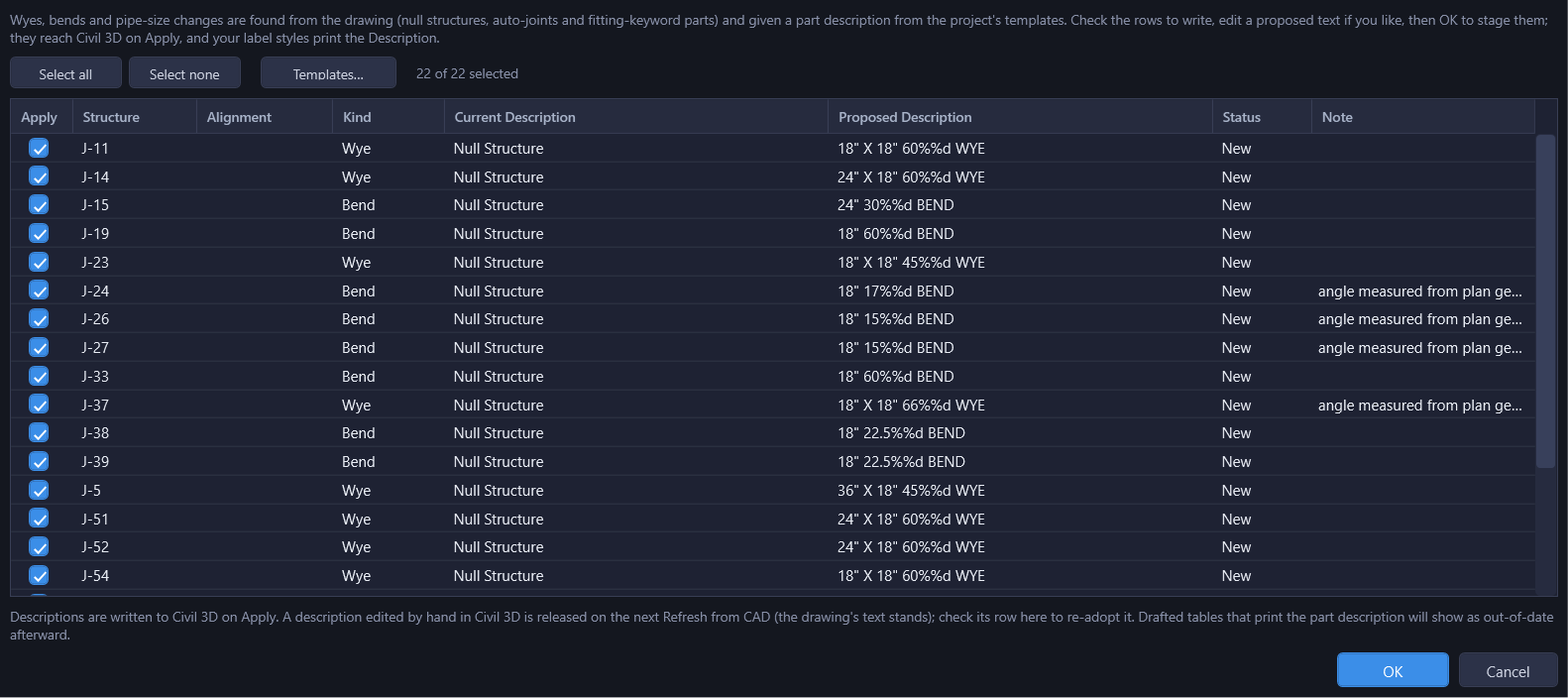
Each row is one structure: Structure name, Alignment, Kind (Wye / Size change / Bend), the Current Description as read from the drawing, an editable Proposed Description, a Status, and a Note carrying any warnings (an unresolved angle, a size change on a bend or wye trunk, a tie-break explanation, and so on). Select all / Select none toggle every row's checkbox at once; you can also check or uncheck rows individually, and edit the Proposed Description text directly. Editing a cell checks that row and marks it as your own text going forward, so future regenerations (for example, from the Templates dialog) leave your edit alone.
Status
| Status | Meaning | Checked by default? |
|---|---|---|
| New | HydraStorm has never authored a description here. | Yes, unless the template already happens to compose the drawing's current text. |
| Current | HydraStorm authored this description and it still matches what the templates compose today: nothing to update. | No (nothing to do). |
| Outdated | HydraStorm authored this description, but the sizes, the resolved angle, or a template changed since, so the text on the drawing no longer matches what would compose now. | Yes. |
| Released | HydraStorm authored this description once, but the drawing's text no longer matches it, because someone (or something) edited the Description directly in Civil 3D. See Hand Edits Release the Label. | No, with a note explaining why. |
| Orphaned | HydraStorm authored this description, but the structure no longer classifies as a wye, bend, or size change (a pipe was added, removed, or the geometry straightened out). | No, with a note; the drawing's text stands. |
Templates…
Opens the template editor: a six-row grid (one per Kind × pipe/box family) with an editable Template column and a read-only Example column that renders the template live against sample sizes, so you can see what it produces before it touches a single structure. A token legend across the bottom lists what each token means. Reset to defaults restores all six templates to the built-in set shown under Templates and Tokens above.
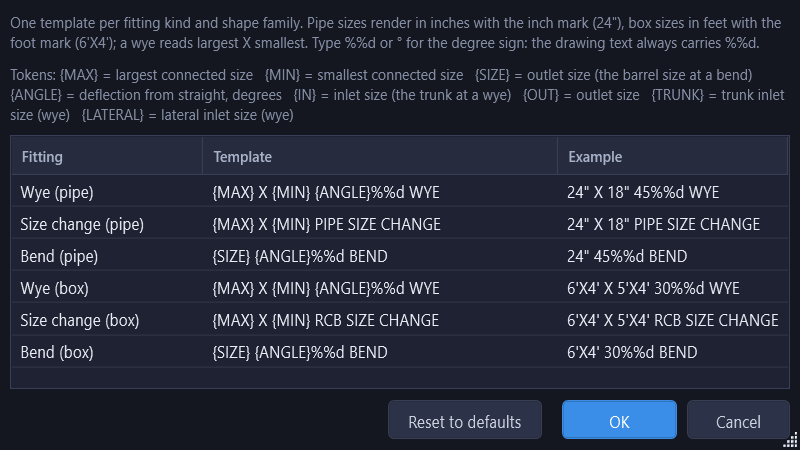
Closing the Templates dialog with OK re-composes every row in the main grid that you haven't hand-edited, so you can see the effect of a template change across the whole network before committing to it. The template set itself is saved with the project (not applied to the drawing) when you click OK on the Label Fittings dialog. Canceling the outer dialog discards template edits too.
Applying to Civil 3D
Clicking OK with one or more rows checked writes each accepted row's Proposed Description onto the working model as an undoable edit (Ctrl+Z reverts it like any other property change), and records what HydraStorm authored so it can recognize the label again later. Nothing reaches the drawing until you click Apply to C3D. See Applying Changes for the general Apply flow. Once applied, any Civil 3D label style you already have printing a structure's Description picks up the new text automatically; HydraStorm doesn't create or manage the label itself, only the text it displays. See Profiles & Labels.
OK is blocked (with the specific problems listed) when a checked row's Proposed Description is empty, or when a template itself is broken: an unknown token, or an empty template for a kind that's in use.
Two Things Worth Knowing
- A size change at a bend or a wye's trunk still gets labelled. Manufactured bends and wyes are cast for one barrel size, so a size change belonging there is a drafting fault, though the fitting still gets its bend/wye label, composed with the sizes as actually drawn, plus a warning on the row (and a matching Network Issues row) telling you to move the size change to a straight joint instead of silently refusing to label it.
- Null structures stay null structures. Labelling one doesn't change what Civil 3D thinks the part is. HydraStorm reads Civil 3D's own part type, and writing a Description is just text on the structure, exactly like it is on a manufactured fitting part.
Tracking and Staying Current
Your edits to label text in the dialog are kept and don't make a row read as outdated on their own. A label is flagged when the fitting's sizes, its angle, or the template change. When one of those inputs moves out from under an authored description, Network Issues shows a Fitting label outdated row for that structure with an Update Fitting Labels… button that reopens this dialog pre-filtered to only the outdated rows.
Hand Edits Release the Label
If a structure's Description is edited directly in Civil 3D, HydraStorm doesn't fight it or overwrite it back. HydraStorm's own copy of that text doesn't change until the next Refresh from Civil 3D; once it re-reads the drawing, the row is marked Released: the drawing's text is what's kept, HydraStorm stops treating it as a description it manages, and the refresh review lists the change as informational (nothing to accept or reject, because it already happened). From there, Label Fittings can re-adopt it: the row shows up Released, unchecked by default with a note explaining why, and checking it re-authors the description from the current template.
Drafted Outputs
Any drafted CAD table that prints a structure's part description will show as out-of-date once you relabel it. Check Output > Drafted Outputs... after a labelling pass the same way you would after any other geometry change.
Related Network Issues Rows
Several rows in Drawing > Network Issues... come from the same fitting classification Label Fittings uses, whether or not you've ever run Label Fittings on the project:
| Row | Meaning |
|---|---|
| Fitting with 3+ inlets | An eligible structure (null structure, auto-joint, or fitting-keyword part) has three or more pipes entering it. A manufactured wye has exactly one lateral, so this isn't classified as a wye at all. Auto Design and the Lateral Match at Wyes rule treat it as an ordinary structure, and it isn't offered a label. |
| Size change at a bend/wye | Conduit size changes across a bend, or across a wye's trunk-through. See above. |
| Wye angle unresolved | A wye's lateral angle couldn't be resolved from plan geometry and none is assigned in the Minor Losses dialog: both the junction-loss angle and the fitting label need one. |
| Pipe shrinks downstream | A classified size change has an outlet smaller than its inlet. Pipe size should never decrease going downstream; Auto Design's no-shrink sweep will upsize it. |
| Fitting label outdated | See Tracking and Staying Current above. |
See Also
- Wyes and the Lateral Match Rule: the grading side of the same wye classification, in Auto Design.
- Applying Changes: how Label Fittings edits (and Rename Parts by Run) reach Civil 3D.
- Drawing Menu (Main Window): where Label Fittings, Network Issues, and Rename Parts by Run all live.